
WooCommerce extension by RedefiningTheWeb
PricePulse – Dynamic Pricing and Discount Rules for WooCommerce
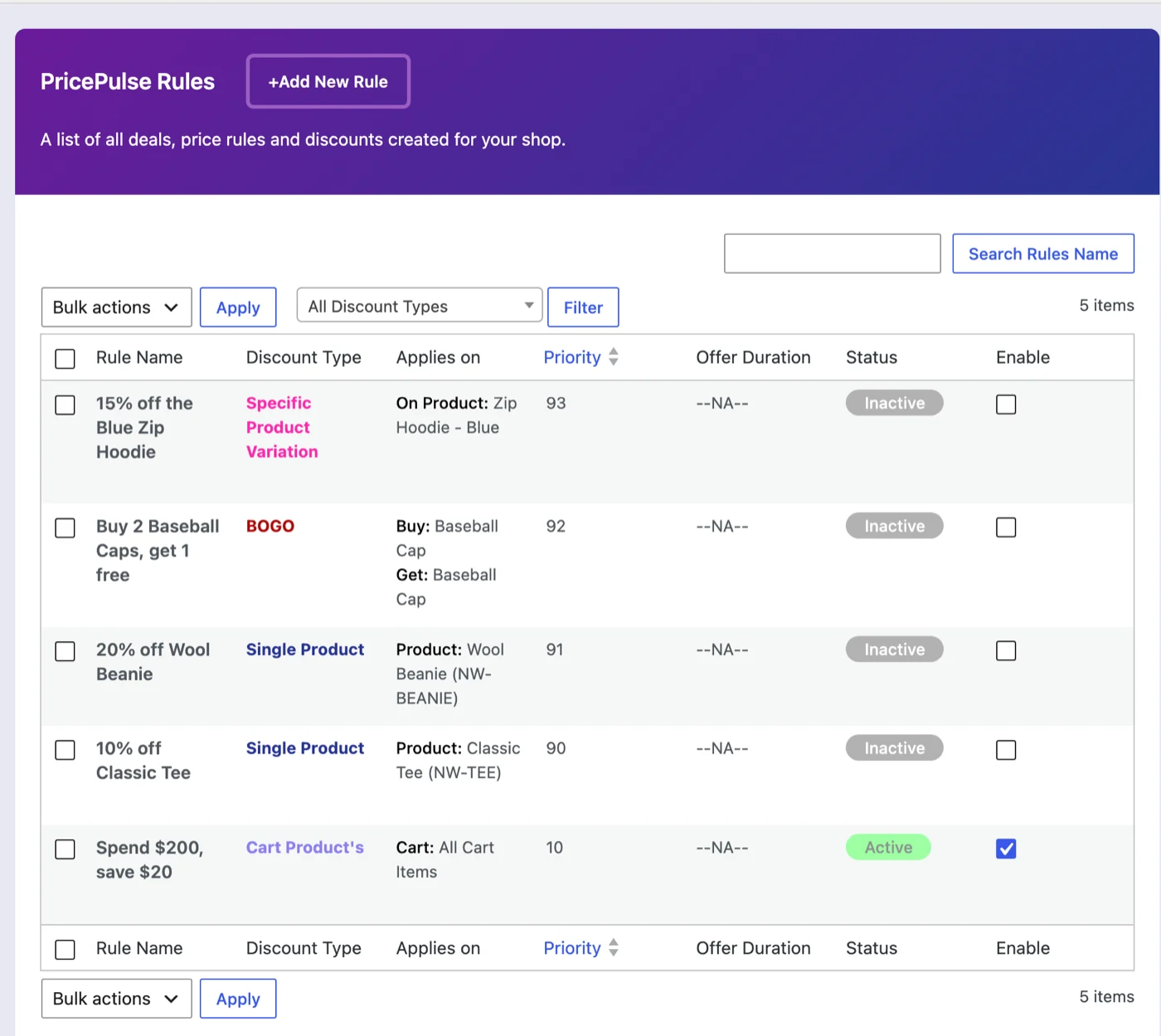
PricePulse Discounts and Coupons is a WooCommerce extension by RedefiningTheWeb that adds dynamic pricing and discount rules to your store. You build a rule: what it applies to (a product, a category, a variation, the whole cart), how much comes off, who qualifies, and when it runs. From then on the discount looks after itself: prices change on the shop and product pages with the original struck through, the cart recalculates as its contents change, and the discount disappears the moment a rule stops matching. There are no codes for shoppers to copy, type, or lose at checkout. The one coupon PricePulse creates is a reward: an Nth Order Reward rule can email a customer a single-use coupon for a later order once their first, nth, or every order is paid.
PricePulse is sold and supported through the WooCommerce Marketplace. The listing is the place to buy it, the documentation on WooCommerce.com walks through every rule type with worked examples, and the tutorial playlist shows nineteen of them built on a live store.
See it on a live store
The overview below shows seven rule types built and followed to checkout on a clean WooCommerce store. Every price on screen is calculated by the rule being demonstrated.
What merchants build with it
- A weekend storewide sale that starts Friday and ends Sunday on its own
- 10% off one category for a month
- Buy 2 t-shirts, get a cap free
- Buy 3, pay for 2 on one product
- Spend $100, save $10
- Buy three or more, get the cheapest item half price
- Buy 2, get the cheaper one half price, repeating for every pair in the cart
- Quantity breaks at 10+ and 20+ units for trade buyers
- 5% off for paying by bank transfer
- A first order discount for new customers
- A reward on every fifth order
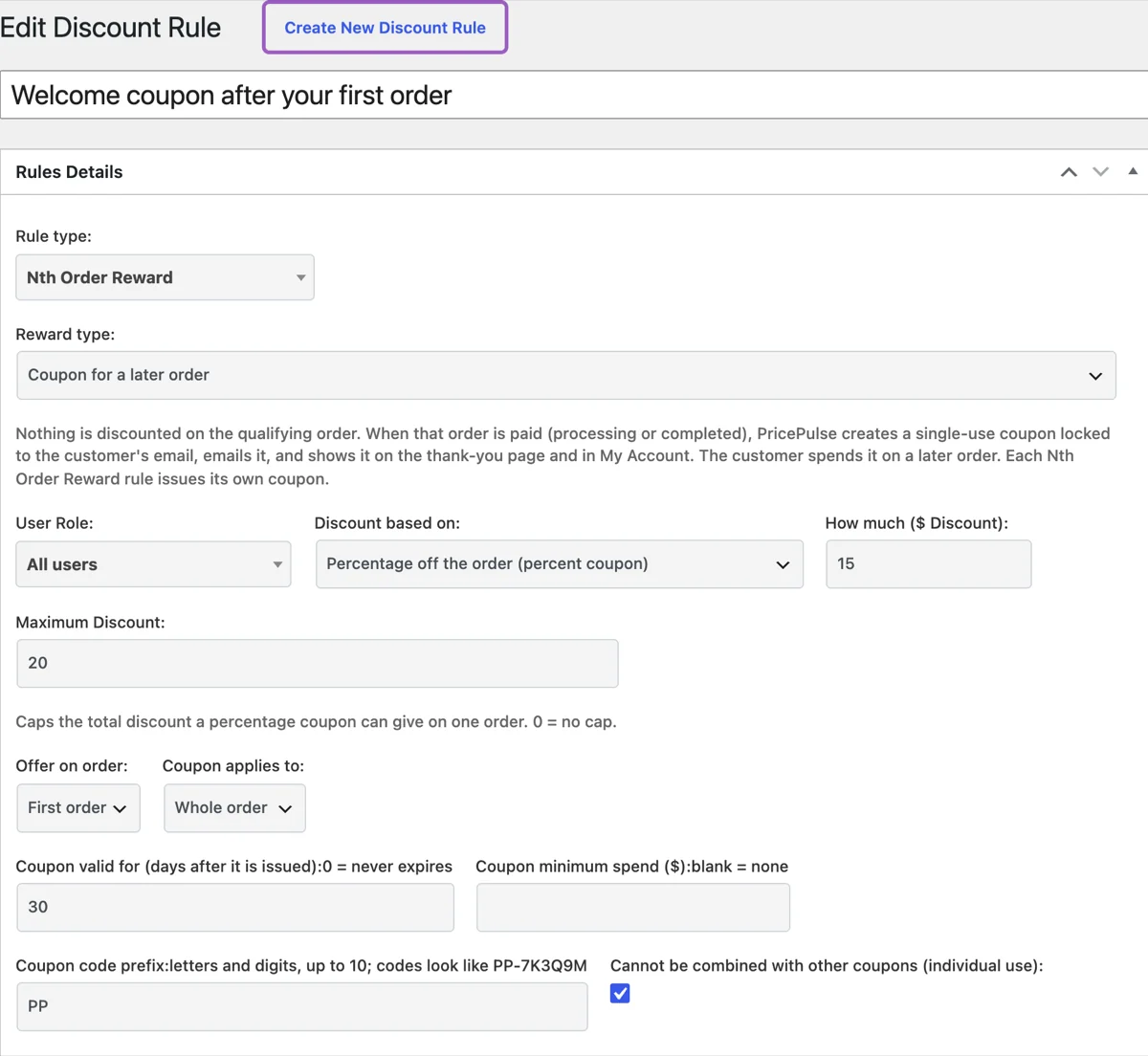
- A 15% coupon emailed after a customer’s first order, for their next purchase
- A quiet discount for a hand-picked list of email addresses
- Wholesale-style tiered pricing restricted to one user role
Every scenario above is a single rule, or one rule plus one setting.
Nineteen rule types in seven families
- Product discounts – Specific Product, Specific Category, Specific Product Variation, Specific Tag, Product Attribute: one product, a category, a tag, a single variation or every product sharing an attribute value such as a colour or size.
- Multiple-product and store-wide discounts – All Products, Multiple Products, Multiple Categories: a hand-picked list of products (with an option that requires the whole set in the cart), several categories at once, or a storewide sale.
- Bulk and tiered quantity discounts – Tiered rule on Product, Tiered rule on Category: quantity bands that improve as the shopper buys more, shown as price tables; restricted to a user role they become wholesale-style pricing.
- Buy one get one free – bogo (buy x get y free): the free product is added to the cart automatically when the order qualifies, removed if it stops qualifying, and the offer repeats for every complete set.
- Cart and cheapest-item discounts – Cart, Least amount product discount: spend-threshold discounts on the order, and the cheapest item in the basket discounted, including the repeating mode behind “buy 2, get the cheaper one half price” and “3 for 2”.
- Payment and shipping method discounts – Payment discount, Shipping discount: a discount for paying by a chosen gateway, or on delivery, recalculated as the shopper changes their choice at checkout.
- Rewards for repeat customers – Next purchase discount, Nth Order Reward, Specific Customer, Plus Member: a discount on the next order, a milestone reward or a coupon for a later order, a private price for named email addresses, and a members’ tier based on orders or spend.
Every rule shares the same form: user role (all customers, guests only or a named role), conditions such as a minimum cart value, a Maximum Discount cap, a priority, start and end dates, and the offer message shoppers see. Store-wide settings decide whether the first matching rule or every matching rule applies, how overlapping discounts are calculated, and how WooCommerce coupons combine with automatic discounts.
New in PricePulse 2.1
Nth Order Reward coupons
Set an Nth Order Reward rule to Coupon for a later order. When the customer’s first, nth or every order is paid, PricePulse creates a single-use WooCommerce coupon locked to their email address, emails it through a standard WooCommerce email you can edit, and shows it on the order page and in My Account. You choose a percentage, a fixed amount off the order or off each eligible item; a product, a category or the whole order; how many days it stays valid; a minimum spend; a code prefix; and whether it can be combined with other coupons. A percentage coupon honours the rule’s Maximum Discount, an unused coupon is withdrawn if the order is cancelled or refunded, and guests never earn one.
Reward coupon notices
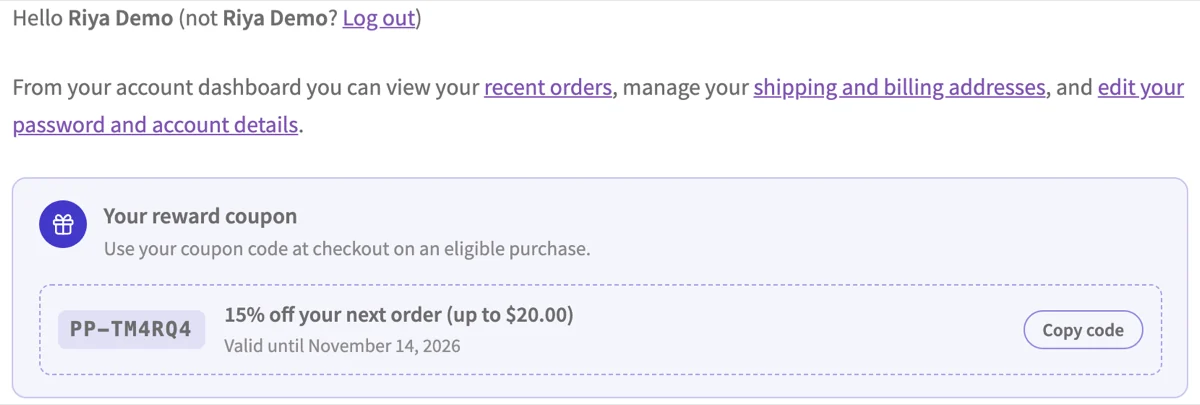
Signed-in customers see the reward coupons they can still use in one card, with the code, what it gives, its expiry and a Copy code button, on the My Account dashboard, the cart, the checkout and the order page, with the classic and the block cart and checkout alike. Each rule chooses where its coupons appear; the heading and subheading are set once for every rule.
Repeating cheapest-item discounts
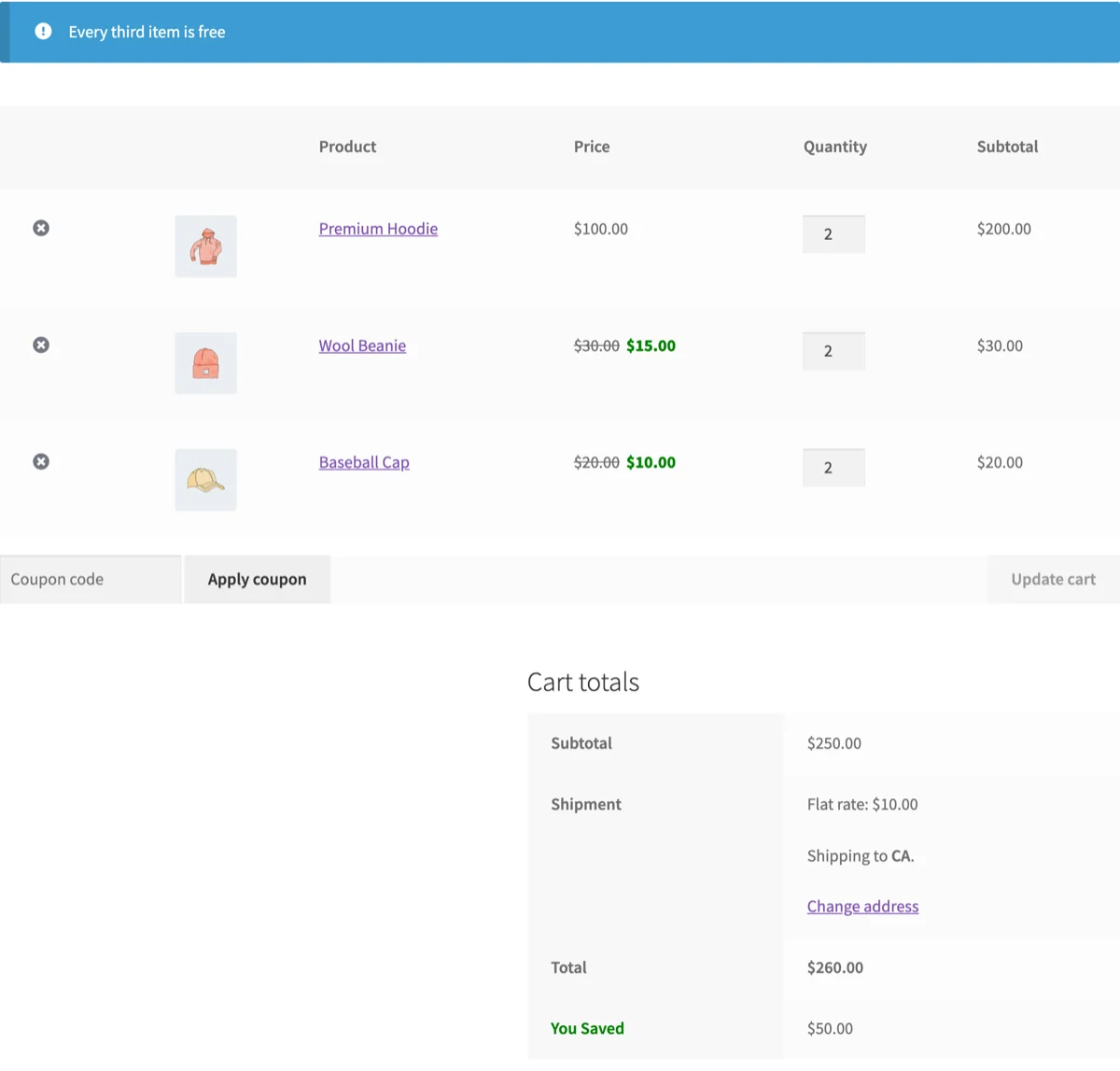
A Least amount product discount rule can now discount the cheapest items of every group of N as the cart grows: group size 2 at 50% gives the cheaper item of every pair half price, group size 3 at 100% is three for two, however many items the shopper adds.
Offers page milestone cards (2.1.1)
On the offers page an Nth Order Reward card says which order qualifies and whether the reward is a discount on that order or a coupon for a later purchase, and its View details panel lists the steps.
The walkthrough is in How to Send a Next Order Coupon Automatically and Repeating Cheapest Item Deals.
Show the offer before checkout
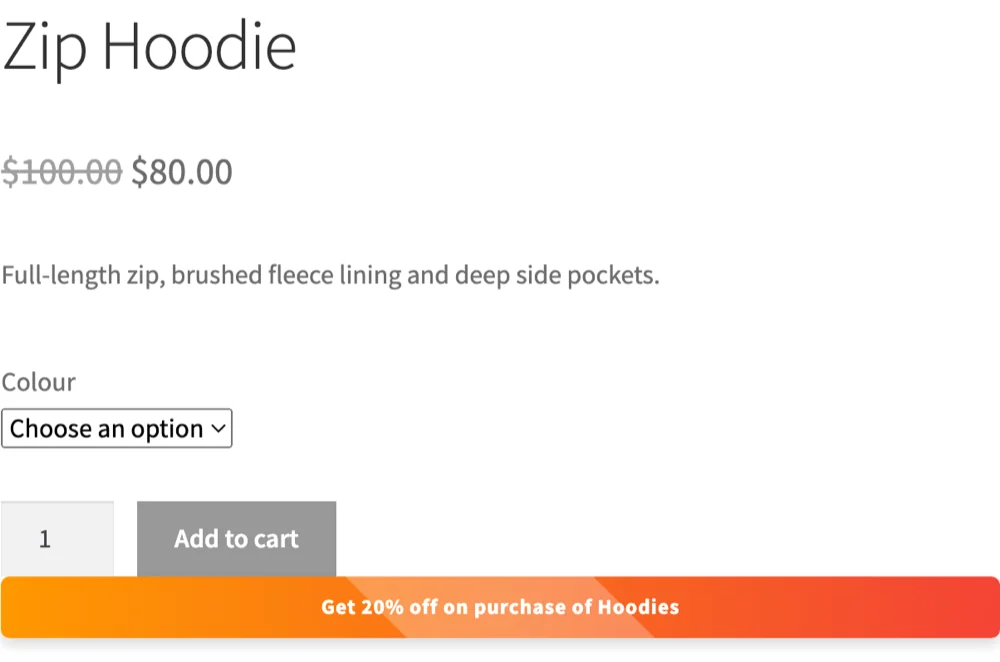
- Shop, product and filtered listing pages show the reduced price with the original struck through, matching your tax display settings.
- Offer messages appear on the products a rule targets, with placeholders for the discount value, dates and cap.
- Offer tables on the shop page and classic cart lay out tiered pricing so quantity breaks are visible before checkout.
- The Offers page shortcode builds a page listing every live offer with filter chips by offer family and one-click add to cart.
- A countdown timer shows how long an offer has left, and cart, payment and shipping discounts appear as their own labelled lines at checkout.
Compatibility you can check
- WordPress 6.5 or later, WooCommerce 6.0 or later, PHP 7.0 or later; tested on WordPress 7.1 and WooCommerce 11.2.
- High-Performance Order Storage (HPOS) is declared and supported; customer order history is read through WooCommerce order APIs.
- The Cart and Checkout Blocks are supported alongside the classic shortcode pages.
- Works for guests and logged-in customers, on tax-inclusive and tax-exclusive stores, with simple products, variable products and individual variations.
- Every release runs WooCommerce’s Quality Insights Toolkit before it ships; version 2.1.1 was tested on WordPress 7.1.3 and WooCommerce 11.2.0 and 11.2.1.
Learn how
Each guide on WooCommerce.com covers one job, with the fields, numbered steps, a worked example and what the shopper sees; the matching tutorial video is embedded on the page.
- How to Create Your First Discount Rule
- How to Discount Products, Categories and Tags
- How to Discount Multiple Products or Your Whole Store
- How to Set Up Bulk and Tiered Quantity Discounts
- How to Setup BOGO for WooCommerce
- How to Set Up Cart and Cheapest Item Discounts
- How to Discount by Payment or Shipping Method
- How to Reward Repeat Customers
- How to Send a Next Order Coupon Automatically
- How to Show Offers on Your Store
All nineteen tutorials in order: the PricePulse playlist on YouTube.
Get PricePulse
PricePulse is sold through the WooCommerce Marketplace, with support and updates through your WooCommerce.com account.
Looking for our other WordPress and WooCommerce plugins? See all RedefiningTheWeb plugins, or contact us about custom work.