Paying affiliates is the part of an affiliate program that decides whether they stay. Most WooCommerce stores end up offering two methods: PayPal for the majority of affiliates, and store credit for the affiliates who also buy from the store. Bank transfer is kept for large partners and for countries the first two do not reach, and Stripe makes sense when the store already runs on Stripe and its affiliates can hold Stripe accounts. This guide covers how to pay affiliates in WooCommerce, comparing the five options on the things that differ between them: what each one costs, who can receive it, how long the money takes, what paperwork it creates and what happens when a payment fails.
We build Affiliate and Referral Program for WooCommerce, which supports all five, so the settings and screens shown here come from it; the comparison itself applies to any program. If you are still designing the program, the step-by-step guide to starting an affiliate program covers commission rules, registration and terms, and this article picks up at the payout step.
Table of Contents
How to pay affiliates: the five methods in one table
Fees are the published US rates on 5 September 2026 and differ by country; the other columns hold for any store.
| Method | Best for | What it costs the store | Speed | Who can receive it | Records and failures |
|---|---|---|---|---|---|
| PayPal Payouts | Most affiliates; small and mid-sized amounts | Flat $0.25 per domestic payout sent through the Payouts API; 2% (capped) per international payout; 4% on currency conversion | Minutes, into the affiliate’s PayPal balance | Anyone with an email address in a country where PayPal can receive money | PayPal keeps the transaction record; a payout nobody claims is returned to you after 30 days |
| Stripe | Stores already on Stripe whose affiliates can hold Stripe accounts | $2 per monthly active connected account plus 0.25% + $0.25 per payout (Stripe Connect, platform-handled pricing) | Days, on Stripe’s payout timing to the affiliate’s bank | Only affiliates in countries Stripe supports for connected accounts | Stripe handles onboarding and identity checks and keeps the record |
| Bank transfer | Large monthly partners; countries the other methods do not reach | Domestic transfers are often free or cost cents; international wires carry a fixed fee at each end plus a currency margin | One to several business days | Anyone with a bank account | You hold the bank details and record each payment yourself |
| Store credit (wallet to coupon) | Affiliates who are also customers | No processor fee; the cost is your margin on the goods the coupon buys | Immediate | Anyone who shops with you | No money leaves; the coupon and its use are the record |
| Wallet balance (held, not yet paid) | Every affiliate, before any of the above | Nothing until it is withdrawn | Credited the moment a commission is approved | Everyone in the program | Withdrawal requests, minimums and holding periods enforce your policy before money moves |
Set the payout policy before you pick a method
The method is the last decision, not the first. Five policy choices shape everything that follows, and all of them belong in the affiliate terms so that nobody argues about them after the first sale.
- Cadence. Monthly is the norm for a store; weekly runs multiply fees and admin, quarterly runs lose affiliates. Pick a fixed day and keep it.
- Holding period. Approve commissions only after your refund window has closed. If customers can return goods for 30 days, a commission approved on day 3 and paid on day 10 is money you may want back on day 25. Match the two windows and the problem disappears.
- Minimum withdrawal. A minimum keeps per-payout fees proportionate and cuts the number of payments to review. A flat $0.25 fee is 5% of a $5 payout and 0.5% of a $50 payout.
- Currency. Commissions are earned in the store currency. Paying an affiliate in another currency adds a conversion charge somewhere, and the terms should say who carries it.
- Who pays the fees. Either the store absorbs processor fees or the affiliate receives the net amount. Both are common; silence about it is not.
Wallets and withdrawal requests: the layer under every method
There are two ways to move money to affiliates. In a push model you calculate what is owed on payout day and send it. In a pull model every approved commission lands in the affiliate’s wallet, and the affiliate requests a withdrawal against that balance whenever it clears the minimum, choosing the payment method they want. The pull model is the one to prefer for a store: the minimum enforces itself, affiliates who prefer to wait and take a larger sum can do so, one Payouts screen shows everything that is owed, and a wallet is also what makes store credit possible, because a balance can be spent as well as withdrawn.
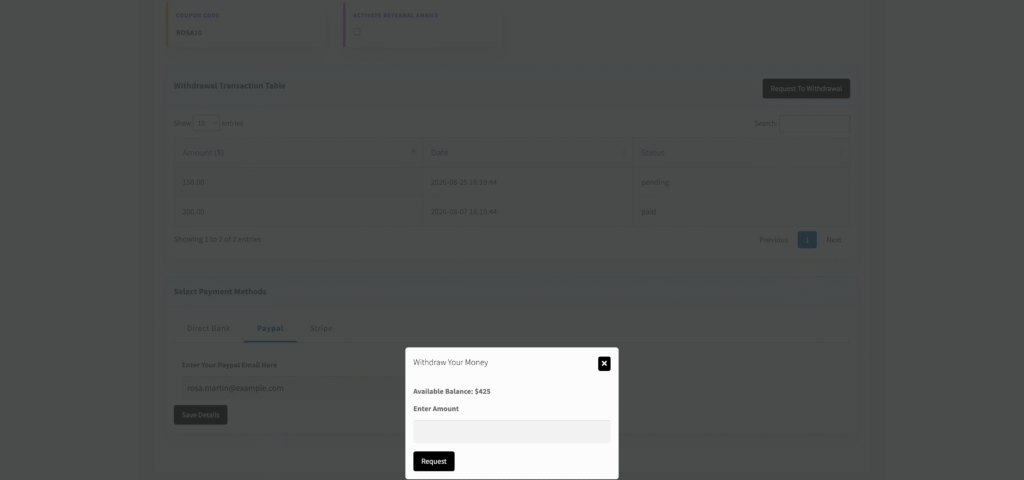
In Affiliate and Referral Program for WooCommerce the wallet is credited when a commission is approved, by you on the Manage Referrals screen or by the approval automation when an order completes; pending commissions are visible to the affiliate but not spendable. From the dashboard’s Payout tab the affiliate saves a payment method under Select Payment Methods (Direct Bank, Paypal or Stripe), presses Request To Withdrawal, sees the Available Balance and enters an amount. The requested amount is committed at that moment and shows in the affiliate’s Withdrawal Transaction Table as pending until you pay it, so the affiliate should request the amount they mean.
PayPal Payouts
PayPal Payouts is the programmatic version of sending money from a PayPal business account: an application sends a batch of payments to a list of email addresses, and each recipient receives the money in their PayPal balance. It is the default choice for affiliate programs because the affiliate needs nothing but an email address, the money arrives in minutes, and a failed payment fails safely. If the address has no PayPal account, PayPal notifies the recipient, and a payout that stays unclaimed for 30 days is returned to your account; PayPal’s payment-processing reference describes the statuses.
Fees are the point to check for your own country. PayPal’s US merchant fees page (5 September 2026) lists a flat $0.25 per domestic payout sent through the Payouts API, 2% of the amount up to a cap per payout for international recipients, and 4% for currency conversion when the recipient is paid in a different currency. Two things follow. Domestic payouts are close to free at any size, so a minimum withdrawal matters less for cost than for admin. International payouts cost more in conversion than in the fee itself, so pay affiliates in the store currency where PayPal allows it and let them convert on their side, or state in the terms that conversion is on them.
Geography is wide but not universal: PayPal can send to most countries, but what a recipient can do with the money differs, and in some countries balances cannot be held or withdrawn in the way affiliates expect. Ask affiliates in unusual markets to confirm they can withdraw PayPal funds to a local bank before you rely on it. Reporting is PayPal’s: every batch and every item has a status and an ID you can match against your own records.
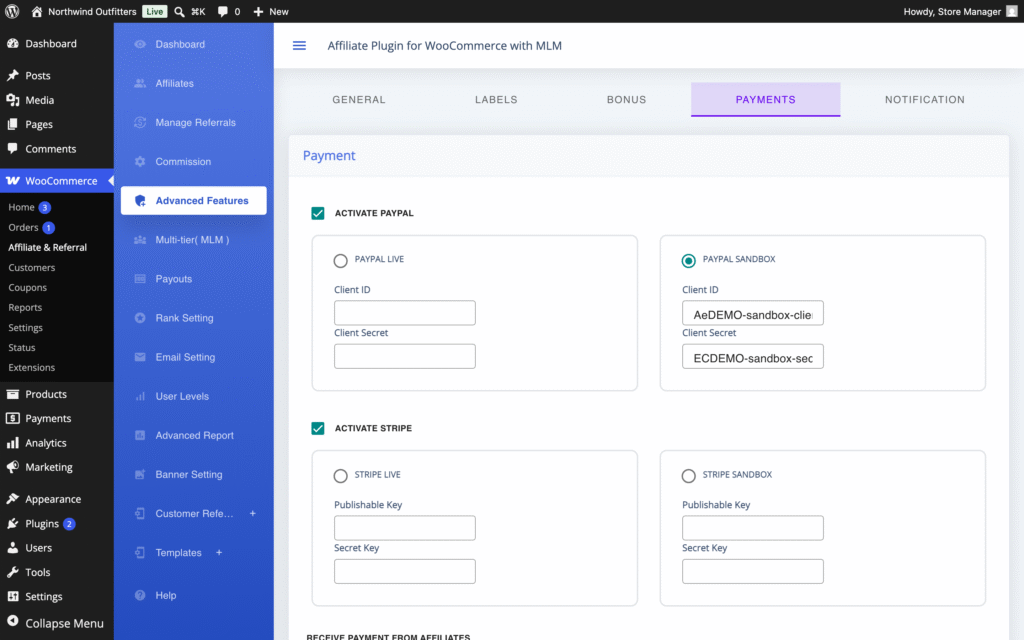
In our plugin, PayPal is switched on under WooCommerce → Affiliate & Referral → Advanced Features → Payments with Activate Paypal, a choice of Paypal Live or Paypal Sandbox, and the Client ID and Client Secret of a PayPal REST app that has Payouts enabled. Affiliates save the email their PayPal account uses under Enter Your Paypal Email Here in their Payout tab. On payout day you select the pending PayPal requests and press Approve selected PayPal payout; the Payouts API sends every selected payment as one batch and the rows are marked paid.
Stripe
Stripe is built to take money in, so paying other people through it means Stripe Connect: the affiliate holds a Stripe account, connected to yours, and you transfer money to it, after which Stripe pays it out to the affiliate’s bank on its normal timing. That gives you Stripe’s onboarding, identity checks and reporting, and it suits stores that already run their checkout on Stripe and whose affiliates are businesses rather than individuals. It suits fewer affiliates than PayPal, because the affiliate must be able to open a Stripe account in a country Stripe supports for connected accounts, and it moves money in days rather than minutes.
Stripe’s Connect pricing (US, 5 September 2026) for platforms that handle their own pricing is $2 per monthly active connected account plus 0.25% and $0.25 per payout sent, with an account counting as active in any month it is paid. For a program that pays twenty affiliates a month that fixed part is the larger cost, and it is why Stripe rarely wins on price for small payouts. Stripe becomes reasonable when payouts are few and large, or when the store wants one provider for everything.
Because the WooCommerce Marketplace does not allow the Stripe SDK to be bundled in a plugin package, our plugin provides Stripe payouts through a free Stripe add-on. With the add-on installed, Activate Stripe sits under the same Payments screen with Stripe live or Stripe Sandbox and the Publishable Key and Secret Key for that mode, and the Payouts screen gains Approve selected Stripe payout, which works on the selected Stripe requests the way the PayPal button works on PayPal ones. If payout options are part of your plugin choice, the AffiliateWP alternatives comparison notes which plugins include PayPal and Stripe payouts and which sell them as add-ons.
Bank transfer
A bank transfer is the cheapest way to move a large domestic amount and the most expensive way to move a small international one. Domestic transfers are free or cost cents at most banks and arrive within a business day or two; an international wire carries a fixed fee from your bank, often another from an intermediary or the receiving bank, and a currency margin on top, and takes several business days. Nobody’s software is involved, which is both the appeal and the cost: you make the transfer from your online banking, you keep the reference, and the affiliate trusts you to do it on the day you promised.
Bank details are personal data, so store them where your privacy policy says you store customer data and delete them when an affiliate leaves. Bank transfer belongs in a program as the exception path: for the two or three partners whose monthly commission justifies a wire, and for affiliates in countries where PayPal or Stripe cannot pay out. Offer it on request rather than as the default, and put the minimum for it higher than for PayPal.
Our plugin treats bank payouts as record-keeping rather than automation. The affiliate saves their bank details under Direct Bank as their payment method; on the Payouts screen you open the request’s Payment Details to see where the money goes, make the transfer from your own bank, then mark the request paid so the payout is recorded against the affiliate’s wallet. No bank connection is involved.
Store credit and wallet coupons
Store credit is the cheapest payout a store can make. When an affiliate spends $100 of commission as a $100 coupon, no money leaves, no processor takes a fee, and what the store gives up is the cost of the goods, not $100. The order the coupon is used on is often larger than the coupon, and the affiliate becomes a customer again. The condition is that the affiliate wants your products, which is true for many affiliates of hobby, craft, sports and specialist stores and false for a coupon site. So store credit should be an option affiliates choose, never the only method; a program that pays only in credit loses the affiliates who send the most sales.
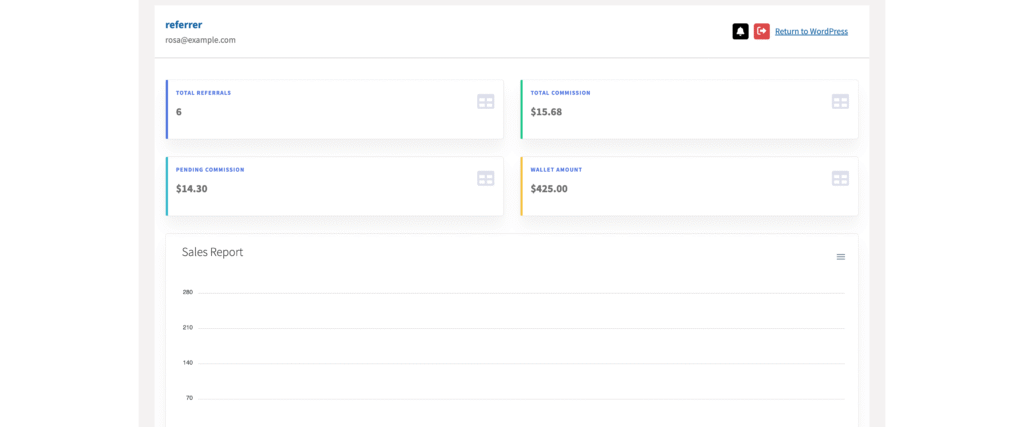
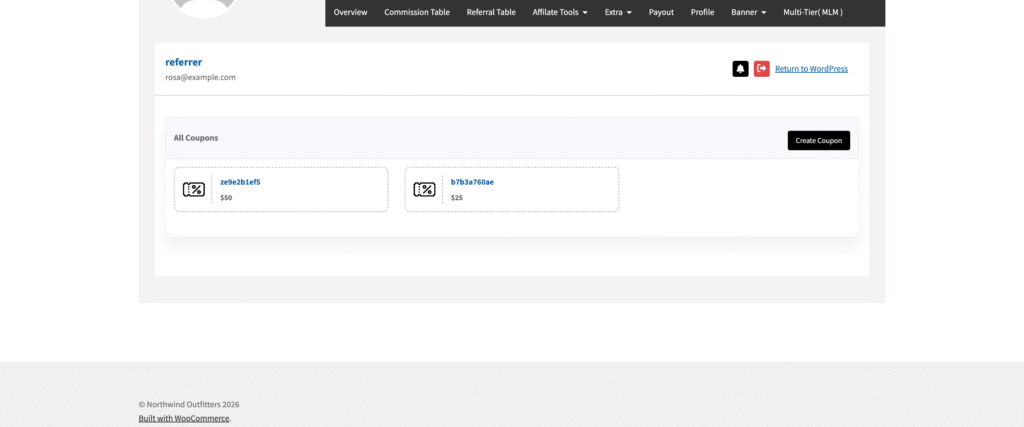
In our plugin the wallet is the single balance for every earning type: sale commissions, multi-tier earnings and bonuses. With Activate Generation of Coupons switched on under Commission, and optionally a Minimum amount for Coupon generation, the affiliate presses Create Coupon in their dashboard and chooses an amount.
The coupon’s value is deducted from the wallet at generation; the coupon is single-use and locked to the affiliate’s own email address; if the order it is used on comes to less than the coupon, the unused remainder is carried into a fresh coupon automatically; and wallet coupons carry no expiry date, because the balance is the affiliate’s earned money. The affiliate decides per amount whether to request a withdrawal or generate a coupon, in any mix.
Do not confuse this with the credit a customer earns in a refer-a-friend program. Those are two balances in two programs, each with its own coupons, and the affiliate program versus referral program guide explains why they should stay apart.
What a monthly payout run costs: a worked example
Take a store that owes $1,200 to twenty affiliates on payout day: fifteen in the store’s own country, five abroad, $300 of the total going abroad. Using the US rates above, the run costs roughly this under each method.
| Method for the whole run | Fees on this run | How it is made up |
|---|---|---|
| PayPal Payouts | About $10, up to about $22 | 15 domestic payouts at $0.25 = $3.75; 2% of the $300 sent abroad = $6.00; plus up to 4% conversion ($12) on whatever is paid in another currency |
| Stripe Connect | About $48 | 20 active accounts at $2 = $40; 0.25% of $1,200 = $3.00; 20 payouts at $0.25 = $5.00 |
| Bank transfer | Your bank’s wire fees, plus the currency margin | Domestic transfers at or near zero; 5 international wires at whatever your bank charges per outgoing wire, plus the receiving banks’ charges and the currency margin on $300 |
| Store credit | $0 in fees | $1,200 of coupons is paid in goods at your cost; at a 60% cost of goods that is $720 of stock, and it arrives as orders |
The table understates the real answer, which is that you do not choose one method for the run. You let each affiliate pick, so the fifteen domestic affiliates cost you $3.75 through PayPal, the affiliates who shop with you cost nothing in fees, and the one partner paid $400 a month gets a bank transfer whose fee is trivial against the amount.
Tax and paperwork
This is general information, not tax advice; the rules depend on where the store and each affiliate are, and an accountant should confirm them for your case. What is true everywhere is that affiliates are self-employed suppliers of a service, not employees, and the store is paying business income that both sides may have to report.
- Collect tax details before the first payout, not after. A US store asks US affiliates for a Form W-9 and foreign affiliates for a Form W-8BEN; stores elsewhere collect whatever identifies a supplier locally, such as a VAT or GST number. Make it part of approving the affiliate.
- Know your reporting threshold. The IRS instructions for Form 1099-NEC current in September 2026 set the reporting threshold at $2,000 of nonemployee compensation paid in the year for payments made after 2025, with inflation adjustments to follow; it was $600 for earlier years. Payments that go through a payment network such as PayPal fall under that network’s own reporting rules, which is one more reason to ask an accountant which form applies to your mix of methods.
- Decide who invoices whom. Outside the US, affiliates registered for VAT or GST may need to invoice you, or you may issue self-billing statements on their behalf; the payout statement your software produces is the starting point either way.
- Keep a record per payout with the date, affiliate, amount, method, provider reference and the commissions it covered. In our plugin every withdrawal request and payout is visible to both sides: the affiliate in the Payout tab, you on the Payouts screen with its status and Payment Details.
Which method for which store
- Most stores: PayPal Payouts as the default, store credit as an option, bank transfer on request. This covers nearly every affiliate at the lowest fee for each.
- A store whose affiliates are its customers (hobby, craft, specialist supplies): lead with store credit and set a low minimum for coupons, keep PayPal for those who ask.
- A store with a few large partners (agencies, distributors, a publisher sending most of the sales): bank transfer for them with a monthly statement, PayPal for the long tail.
- A store already built on Stripe whose affiliates are businesses in Stripe’s supported countries: Stripe, accepting the fixed per-account cost for the single-provider reporting.
- A store with affiliates in markets PayPal serves badly: bank transfer with a higher minimum so that the wire fee stays a small share of the amount, or store credit where the affiliate buys from you anyway.
How payouts work in Affiliate and Referral Program for WooCommerce
Affiliate and Referral Program for WooCommerce runs the pull model described above. Approved commissions collect in each affiliate’s wallet; the affiliate requests a withdrawal from the Payout tab within the Minimum amount of money an affiliate needs to withdraw and Maximum amount of money an affiliate can withdraw that you set on the Commission screen, and requests outside those limits are refused at request time. There is no limit on how often an affiliate may request, only on how much. Every request then appears on WooCommerce → Affiliate & Referral → Payouts with the affiliate’s name, amount, status, request date and Payment Details, whatever method they chose, so PayPal, Stripe and bank requests sit side by side on one screen.
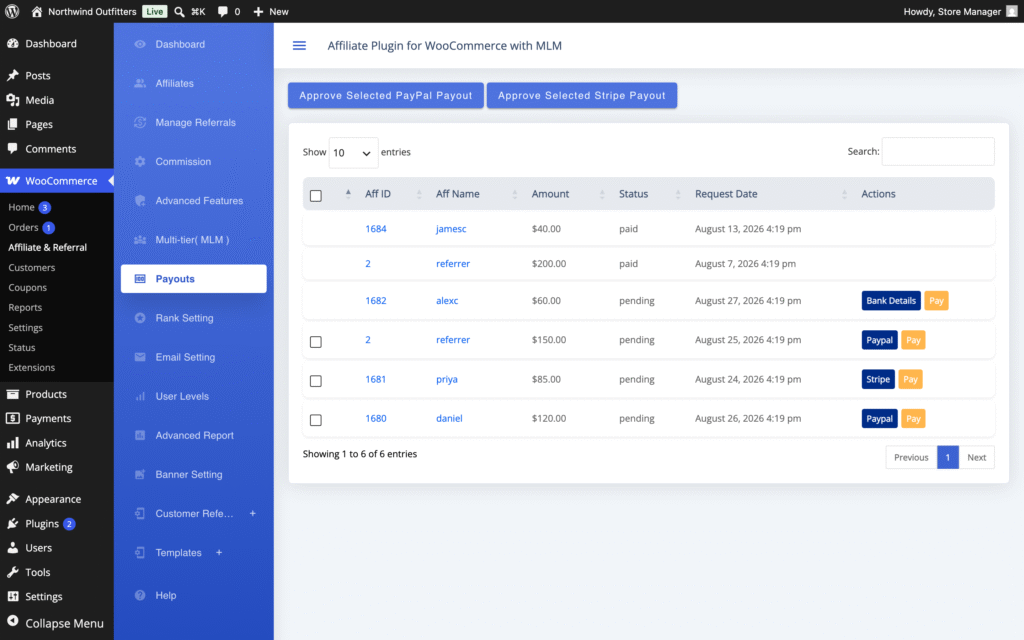
Payouts are always started by you. Select the requests and press Approve selected PayPal payout to send every selected PayPal request as one batch, Approve selected Stripe payout for the Stripe requests, or open Payment Details and mark bank requests paid one by one; each bulk button acts only on the requests that match its method.
There is no payout schedule running in the background, so money leaves your accounts only when you press the button, which keeps refunds and cash flow under your control. The click-by-click setup for each method is in Pay Affiliates via PayPal, Stripe and Bank, the wallet, withdrawal limits and coupon conversion in Pay Affiliates with Store Credit and Wallets, and every setting of the plugin in the complete RedefiningTheWeb reference.
Want PayPal payouts in bulk, Stripe through a free add-on, bank records and store credit from one plugin?
Affiliate and Referral Program for WooCommerce gives every affiliate a wallet, lets them choose how they are paid, and puts every request on one Payouts screen. It is sold on the WooCommerce Marketplace for $96 a year.
Related guides:
Frequently asked questions
What is the cheapest way to pay affiliates?
Store credit, because no money leaves the store and the cost is your margin on the goods the affiliate buys. Among cash methods, PayPal Payouts is usually the cheapest for small domestic amounts, a flat $0.25 per payout in the US through the Payouts API on 5 September 2026, and a domestic bank transfer is the cheapest for large amounts.
Can affiliate payouts be automatic?
The sending can be. In Affiliate and Referral Program for WooCommerce one click pays every selected PayPal request as a single batch through the PayPal Payouts API, and the same applies to Stripe requests through the free add-on. The decision to pay stays with you: there is no background process that moves money without you pressing the button, which keeps refunds and cash flow under control.
Do affiliates need a PayPal account to be paid with PayPal Payouts?
They need an email address. If the address has no PayPal account, PayPal notifies the recipient and holds the money; a payout that stays unclaimed for 30 days is returned to the sender. Ask each affiliate for the email their PayPal account uses before the first payout run.
Should I set a minimum payout amount?
Yes. A minimum keeps per-payout fees proportionate, reduces the number of payments to review, and gives refunds time to land before money leaves. Set it with your refund window and typical commission in mind. In Affiliate and Referral Program for WooCommerce the minimum and maximum withdrawal amounts are set on the Commission screen, and requests outside them are refused at request time.