Affiliate fraud in a WooCommerce store is rarely a hacker. It is an affiliate buying through their own link, a coupon code that leaks to a deal site, an order refunded after the commission was paid, or a signup bonus collected by accounts that do not exist. Each scheme has a control, and most of the controls are settings you switch on once, a review step you keep, or a line in the terms. This guide lists the nine WooCommerce affiliate fraud schemes a store actually meets, what each one costs, and the control that stops it, including which controls are off by default and which problems the plugin leaves to your own judgement.
We build Affiliate and Referral Program for WooCommerce, so the settings and screens shown are its own; the schemes and the review habits apply to any program. This is the “protect the program” step of the step-by-step guide to starting an affiliate program.
Table of Contents
WooCommerce affiliate fraud: the nine schemes and their controls
| Scheme | What it costs you | The control | Default in Affiliate and Referral Program for WooCommerce |
|---|---|---|---|
| 1. Self-referral | Commission on sales you would have had anyway, at your own customers’ expense | Restrict commission on own referral; the Traffic tab | Off; most stores should turn it on |
| 2. Coupon leakage | Discount plus commission on shoppers who found the code on a deal site | Coupon ownership enforcement; WooCommerce coupon limits; two-way commission discounts through the tracked link instead of a public code | Enforced automatically for affiliate coupons |
| 3. Last-click hijacking | The affiliate who did the work loses the sale to whoever touched the shopper last | Attribution rules in the terms; lifetime mapping where it fits | Last-click, 30-day cookie |
| 4. Refund after approval | Commission paid on money you gave back | Holding period; approval on Completed; Reject commission on refund | Every commission starts pending; refund rejection is a setting |
| 5. Stolen-card orders | Chargeback fee, lost goods and a commission | Your gateway’s fraud checks; the same holding period | Not a plugin control |
| 6. Bonus farming | Signup, click and sharing bonuses paid to bots and duplicate accounts | Small amounts, first-click de-duplication, sharing limits, manual approval of every bonus | Bonuses are 0 until you set them; each lands pending |
| 7. Fake affiliates | Spam links, brand damage, a program full of accounts that never sell | Affiliate Verification; questions on the registration form | Off; anyone who registers is active immediately |
| 8. Network stuffing (multi-tier) | Per-level commission on recruits that are the same person | Verification, the Parent columns, plan width, the monthly cap | Network earnings not capped unless you include them |
| 9. Brand bidding and misleading promotion | Paying commission on your own brand searches; complaints from misled buyers | Terms, monitoring, rejection and deactivation | Not a control in the plugin; you define the rule and enforce it |
1. Self-referral
The oldest scheme: an affiliate clicks their own link, or applies their own coupon, and buys. Nothing about it looks unusual on the order, and it is not always dishonest; people simply assume the discount and the commission are both theirs. It matters because the commission is paid on a sale that needed no promotion, and because a program that allows it pays its own customers to become affiliates.
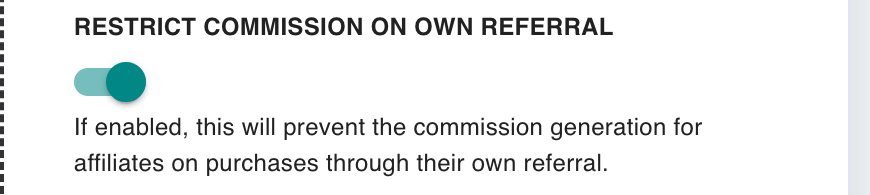
In our plugin the switch is Restrict commission on own referral on the Commission screen, and it is off by default, which surprises most merchants. Turn it on before the first affiliate signs up, and say so in the terms. It is also the usual reason an affiliate’s own test order “does not track”: with the restriction on, a logged-in affiliate buying through their own link earns nothing, which is the point. The tracking troubleshooting checklist starts from exactly that case.
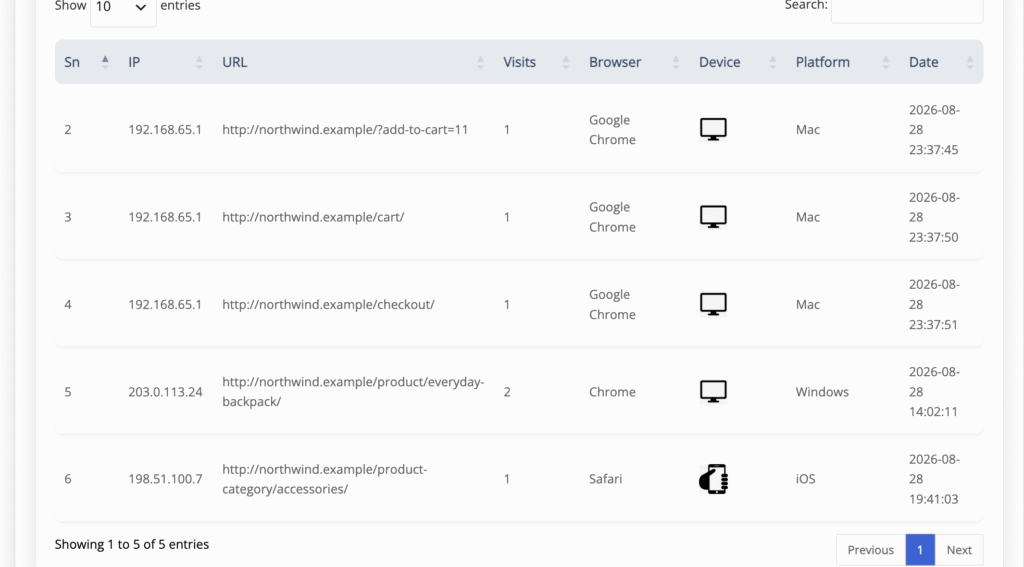
The restriction covers the affiliate’s own account. The variant it does not cover is a second account: an affiliate registers as a customer under another email and buys through their own link. That one is caught by reading, not by a switch: the Traffic tab on the affiliate’s detail view lists every recorded visit with IP address, page, browser, device, platform and date, and a “customer” whose visits share the affiliate’s IP and device and who buys once, on the affiliate’s link, is worth a question before approval.
2. Coupon leakage
Reusable affiliate coupon codes can be copied or reposted to coupon sites, deal forums or other public channels. When that happens the damage is double: the shopper who found the code on a deal site gets the discount, and the affiliate who owns the code gets commission on a sale that came from your own search traffic, not from their promotion. Our plugin treats affiliate coupons as personal to their owner.
If a shopper arrives through affiliate A’s link and then tries affiliate B’s code, the store removes that coupon from the cart rather than let one affiliate’s discount be spent on another’s referral; a shopper with no affiliate attached to their session can use any assigned code normally. That stops harvested codes from being applied on top of someone else’s traffic, and it means an affiliate’s discount is only ever spent on sales they can be paid for.
The rest is ordinary coupon hygiene, because an affiliate coupon is an ordinary WooCommerce coupon: set usage limits, an expiry date and product restrictions, keep the discount modest, and name codes after the affiliate so the coupons list stays readable. A code that appears on a deal site can be retired and replaced in a minute; the affiliate’s link keeps working. The assignment and the credit rules are in the coupon tracking guide.
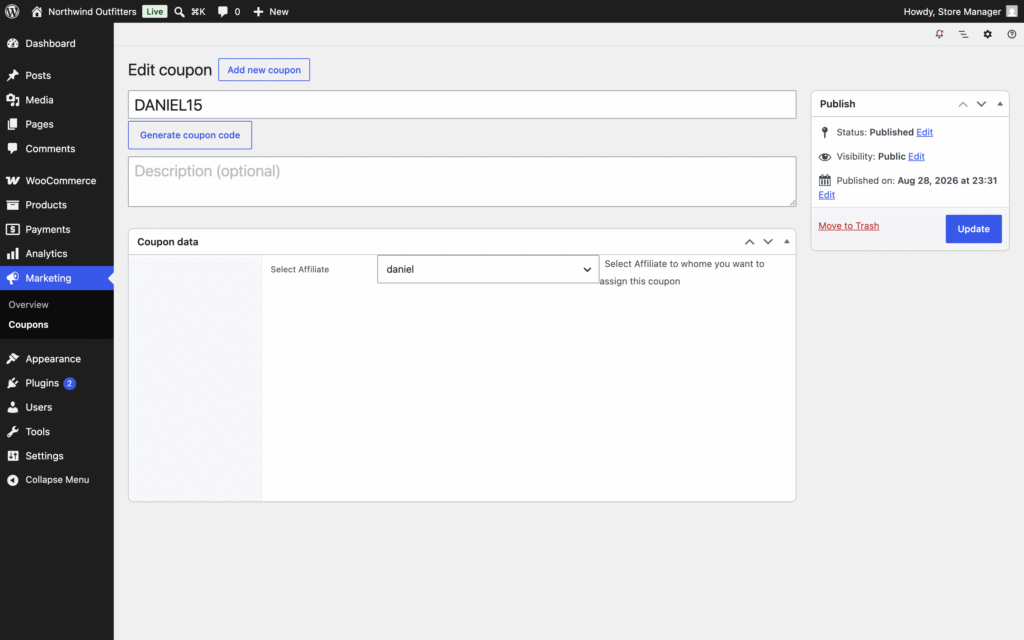
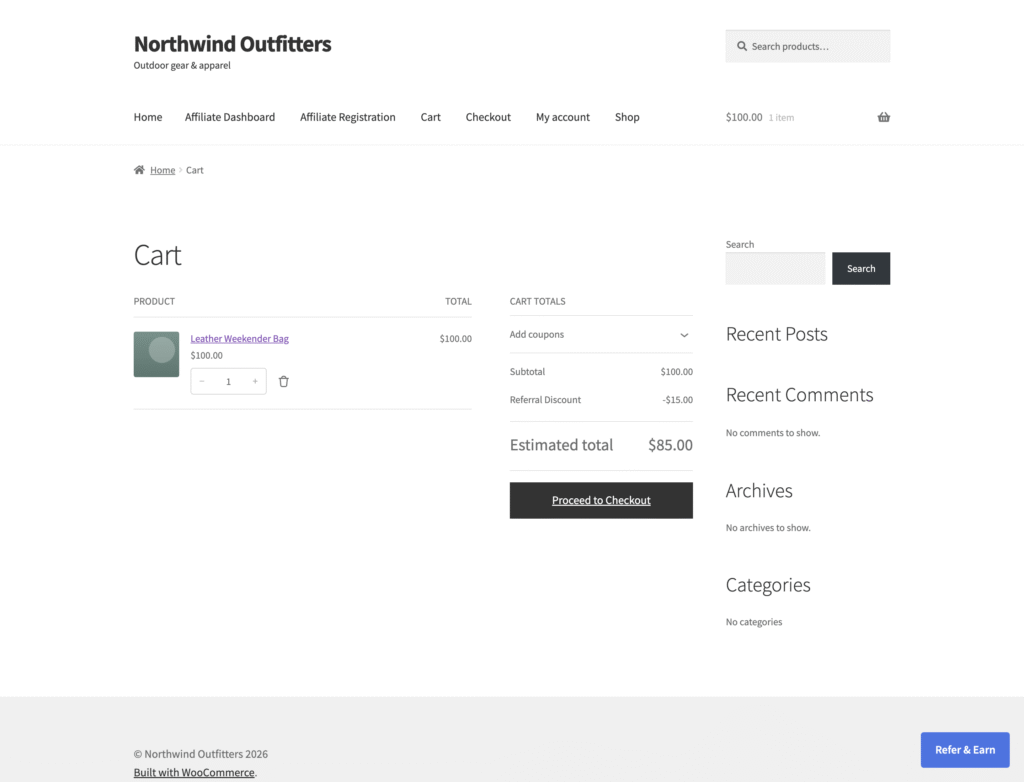
There is also a way to give referred shoppers a discount without handing out a code at all. With Enable Two Way Commission switched on in our plugin, anyone who arrives through an affiliate’s tracked referral link gets the discount you configure, store-wide or per product, applied to their cart automatically as a Referral Discount line; there is nothing to type and nothing to copy. The affiliate promotes the same link they already use, the shopper sees the saving at the cart and checkout, and the affiliate earns their normal commission on the sale, which the discount does not reduce.
Because the offer travels with the referral rather than with a reusable string of characters, there is no public code to be reposted on coupon sites, so the leakage described above has far less to leak. It is a mitigation, not a wall: a referral link can still be shared, attribution still follows the cookie rules, and the discount is a cost you fund on top of the commission, so set both amounts with the margin in mind.
Coupon tracking stays a separate option for the places a link cannot go, such as podcasts, video and print: use assigned affiliate coupons for campaigns where a code is practical, and two-way commission for link-based campaigns where you do not want to expose a public discount code. The setup is in Two-Way Commission and Referral Discounts.
| Approach | What happens | Exposure |
|---|---|---|
| Assigned coupon code | The affiliate shares SAVE15 → the code is reposted on coupon sites and forums → shoppers who never saw the affiliate use it, and the store pays the discount plus the commission | One reusable public code |
| Two-way commission | The affiliate shares their tracked link → the referred shopper gets the configured discount at the cart and checkout → the affiliate earns their commission | No public discount code; the offer stays attached to the referral |
3. Last-click hijacking
Attribution in most programs, ours included, is last-click: each valid click replaces the referral cookie, and a coupon applied in the cart rewrites it too. That is fair when a shopper genuinely changed their mind, and unfair when a deal site or browser extension inserts itself at the checkout step, after a reviewer did the persuading. The plugin’s precedence is fixed and documented: a lifetime mapping first, then the most recent link click or applied coupon, then a code typed at checkout, then nobody.
Two things follow. Write the attribution rule into the terms so that affiliates know the model before the first dispute; and if your program is built on content affiliates who introduce customers, consider lifetime commission, which ties a logged-in customer to the first affiliate who referred them and outranks later clicks and coupons. The tracking and attribution reference lists the order of precedence and the cookie window.
Be honest about the limits too. Tracking runs in the visitor’s browser with JavaScript; a strict content blocker or an optimizer that strips scripts can stop a click registering, and there is no server-side fallback. Plan the terms around “tracked visits” rather than promising that every click counts.
4. Refund after approval
The expensive one. An order comes in, the commission is approved and paid, and then the order is refunded. Sometimes the buyer is the affiliate’s friend; sometimes it is an ordinary return. Either way the money has left twice. The control is timing. In our plugin every commission starts as a pending record on the Manage Referrals screen and nothing reaches an affiliate’s wallet until it is approved, by you or by Affiliate Referral Automation when the order reaches Processing or Completed.
Set the automation to Completed at most, or leave it off and approve in batches after your refund window has closed, and pair that with a payout minimum and a monthly payout day so that money leaves later still; the payout methods guide covers the holding period from the payout side.
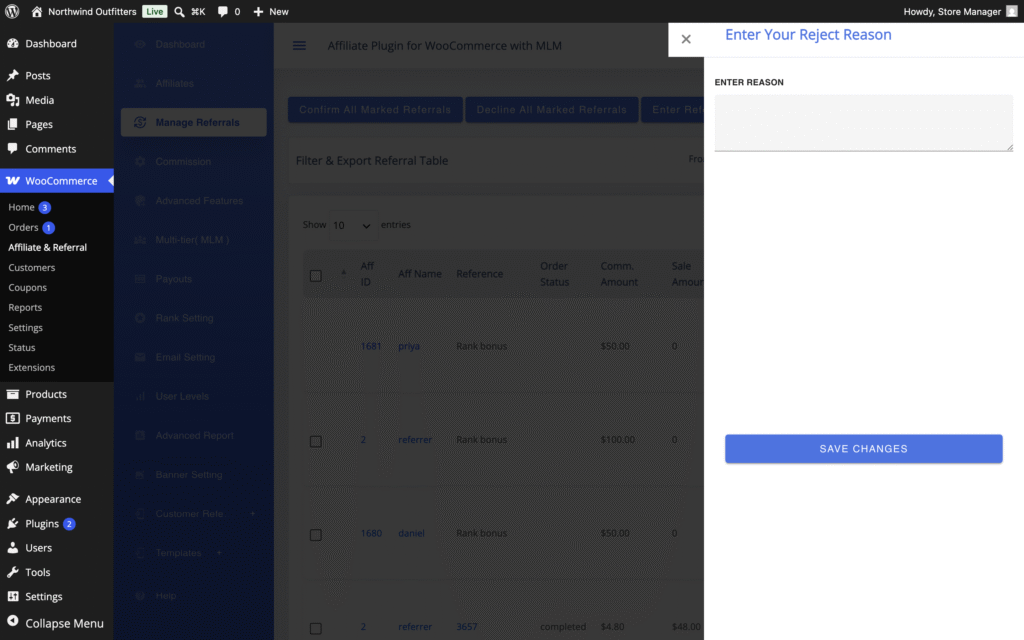
Reject commission on refund on the Commission screen does the rest for orders refunded while the commission is still pending: the record is rejected on its own. It does not reach back. A commission you have already approved stays in the affiliate’s wallet even if the order is refunded afterwards, and rejecting a record later does not take money out; recover it, if you need to, by agreement with the affiliate. That is the strongest reason to let orders settle before approving. Rejections carry a reason the affiliate can read on their dashboard, so use it: an affiliate who sees “order refunded” three times stops sending that buyer. The lifecycle is in Approve, Reject and Manage Referrals.
5. Stolen-card orders
An affiliate, or someone using their link, places orders with stolen card details. The chargeback arrives weeks later with a fee, the goods are gone, and the commission was approved in between. No affiliate plugin stops this; your payment gateway’s fraud screening and WooCommerce’s own order review do, and the holding period above is what keeps the commission from being paid before the chargeback lands. A pattern to watch on the Manage Referrals screen is one affiliate whose orders are all first-time customers, all high value, all within a few hours; it is a pattern, not proof, so ask before you reject.
6. Bonus farming
Bonuses pay for things that are not sales, which is exactly what makes them farmable. A signup bonus invites accounts that exist only to be counted; a pay-per-click bonus invites scripts; a sharing bonus invites a hundred shares a day. Three habits keep them useful. Keep the amounts small, because a bonus is a nudge, not an income. Use the built-in limits: in our plugin the pay-per-click bonus counts a visitor’s first click only, so repeat clicks from the same visitor do not stack, and the sharing bonus takes a daily, weekly or monthly limit.
And approve. Every bonus is created as a pending record on the Manage Referrals screen, exactly like a sale commission, so nothing reaches a wallet without your decision, and the Traffic tab shows whether the clicks behind a bonus came from many people or one. Bonuses are not counted by the monthly commission cap, so size them as if they will be claimed.
7. Fake affiliates
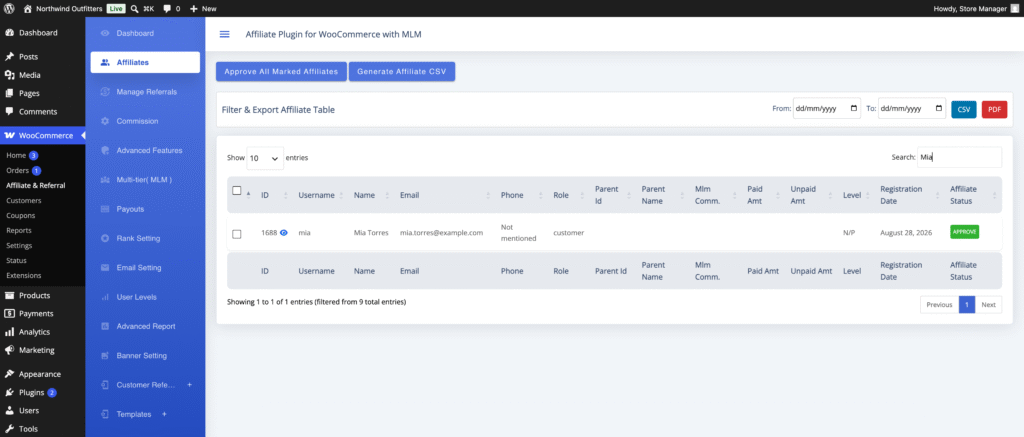
Open registration attracts bots, spam accounts and people with no audience who will paste your link into comment sections. By default anyone who registers in our plugin becomes an active affiliate immediately. Turn on Affiliate Verification under Advanced Features → General and every application waits on the Affiliates screen until you approve it, singly from the row or in bulk with Approve all marked affiliates; an applicant you do not approve simply stays inactive.
Ask for a website, a social handle and an audience description on the registration form, because a real affiliate has answers and a bot does not, and read the answers before approving. The Affiliates screen and the detail view are covered in Approve and Manage Affiliates.
8. Network stuffing in a multi-tier program
Where affiliates earn a per-level rate on their recruits’ sales, an affiliate can recruit themselves: register a second and third account under their own link, fill the recruit slots, and collect network commission on sales that are all their own. The controls are the same review habits with two additions. Verification applies to recruits as much as to anyone, and the Affiliates screen shows each affiliate’s Parent Id and Parent Name, so a cluster of new accounts under one recruiter, registered on the same day, with the same visit fingerprint on their Traffic tabs, is easy to see.
Second, the monthly ceiling: by default network earnings are not counted by Maximum commission to an Affiliate in a month; enable Include MLM commission in monthly cap if one affiliate’s total should have a ceiling whatever its source. Pick the plan type before recruiting starts, because a plan whose members earn only once all their recruit slots hold active recruits sets a real bar, and reshaping a live network later is disruptive.
9. Brand bidding and misleading promotion
The last scheme is the one the plugin does not detect for you: an affiliate buys search ads on your brand name and collects commission on customers who were already looking for you, or promotes with claims and discounts you never offered. The controls are policy and attention. Put the rules in the terms in plain words: no bidding on the brand or its misspellings, no fake countdowns or invented discounts, no unsolicited email, disclosure where the law requires it.
Search your own brand once a week and look at who is advertising. When an affiliate breaks the rules, reject the pending commissions with the reason written out, and deactivate the account from the Affiliates screen. Affiliate and Referral Program for WooCommerce does not automatically monitor paid-search brand bidding or ad copy, so define the rule in your affiliate terms and monitor and enforce it yourself; dedicated affiliate-compliance and paid-search monitoring services exist for programs large enough to need them.
A ten-minute weekly review
- Applications: approve the affiliates who answered the form like people, leave the rest inactive.
- Pending referrals older than your refund window: approve in bulk with Confirm All Marked Referrals; reject the ones tied to refunded orders with a reason.
- Anything odd: open the affiliate’s detail view and read the Traffic tab against the Referrals tab; same IP and device behind every “customer” is the tell.
- Coupons: search a deal site for your store name; retire and replace any leaked code.
- Brand search: one search for your brand name; note any affiliate ads.
- Payouts: pay once a month, after the review, never before it.
The fraud controls in Affiliate and Referral Program for WooCommerce
Affiliate and Referral Program for WooCommerce ships the controls above as settings and review screens rather than as a black box. On the Commission screen: Restrict commission on own referral, Restrict commission on sale items, Exclude products from affiliate commission, Reject commission on refund, Maximum commission to an Affiliate in a month and Affiliate Referral Automation. Under Advanced Features: Affiliate Verification, Cookie Expiration (30 days when left empty) and the bonus limits.
In the data: each recorded visit logged with its page, IP address, browser, device and platform on the affiliate’s Traffic tab, every commission and bonus created pending on Manage Referrals with approve and reject actions and a written reason, and affiliate coupons locked to their owner in the cart. What it does not do is monitor paid search or judge intent: it gives you tracking, review and account-control information, and you decide whether the activity breaks your program terms. The complete RedefiningTheWeb reference lists every setting.
Want these controls in your WooCommerce affiliate program?
Affiliate and Referral Program for WooCommerce records each tracked referral visit, keeps every commission pending until you approve it, rejects pending commissions on refunded orders, locks affiliate coupons to their owner and lets you vet every applicant. It is sold on the WooCommerce Marketplace for $96 a year.
Related guides:
Frequently asked questions
Can affiliates earn commission on their own purchases?
Yes by default, which surprises most merchants. In Affiliate and Referral Program for WooCommerce, turn on Restrict commission on own referral on the Commission screen and an affiliate buying through their own link or code earns nothing. A second account under another email is caught by reading the Traffic tab, not by a switch.
What happens to a commission when an order is refunded?
With Reject commission on refund enabled, a commission that is still pending is rejected automatically. A commission you have already approved stays in the affiliate’s wallet and is not reversed, so approve after your refund window has closed and pay out later still.
How can I tell whether an affiliate’s clicks are real?
Open the affiliate on the Affiliates screen and read the Traffic tab: every recorded visit shows the page, IP address, browser, device, platform and date. Many visitors from many places look like promotion; the same IP and device behind every referred order looks like one person.
Should I approve commissions automatically?
Only on Completed, and only if your refund window is short. Every commission starts pending; automatic approval on Processing or Completed saves work but pays before returns arrive. Many stores approve in batches once a week or once a month, after the review, and pay out after that.