Six ways to run a refer-a-friend program on a WooCommerce store: five customer referral plugins and one hosted service, compared for merchants who have to pick one. The short version: if you want customer referrals now and affiliates later, our own plugin covers both for $96 a year; if you already run AutomateWoo, its Refer A Friend add-on is the obvious choice at $99 a year on top; if you want the lightest possible coupon program, the WPGens plugin has a free version and the clearest documented abuse rules; and if you want someone else to run the campaigns, ReferralCandy will, for a monthly fee plus a percentage of what it earns you.
Disclosure before anything else: we build Affiliate and Referral Program for WooCommerce, one of the six. That means we can show you its actual screens and tell you what it does not do, and it also means you should read the section on it with the bias in mind. The other five we researched from their own documentation and pricing pages on 5 and 6 September 2026; we did not install them, and we say so rather than implying a test bench we never built. If you have not yet decided between customer referrals and an affiliate program, the difference between the two comes first.
Table of Contents
How we compared these six
- Built by us: Affiliate and Referral Program for WooCommerce. The four screenshots below are of its real screens on our seeded demo store, and the limitations we list come from our own documentation and issue tracking, not from marketing copy.
- Read, not run: AutomateWoo Refer A Friend, WPGens Refer a Friend, EchoRewards, WPLoyalty and ReferralCandy. Every statement about them comes from the vendor’s own product page, documentation or pricing page. We have not installed them, so you will not find screenshots of them here: reproducing a vendor’s marketing images would prove what they claim, not what we saw. Where a vendor does not document something, we say that instead of guessing.
- Prices: checked 7 September 2026, in US dollars as each vendor lists them. Several were running sales that day, which we note; treat any figure here as a starting point and check the current one.
- What we did not weigh: conversion claims. No vendor here publishes methodology behind its uplift numbers, ours included, so none are quoted.
Which one fits which store
| Option | Best fit | Referral method | What the advocate earns | What the friend gets |
|---|---|---|---|---|
| Affiliate and Referral Program for WooCommerce (ours) | Stores that want customer referrals now and professional affiliates later, from one plugin | Personal link | Store credit, percentage or fixed, calculated on the friend’s order total | Percentage or fixed discount on the cart subtotal, applied automatically |
| AutomateWoo – Refer A Friend | Stores already running AutomateWoo for their email automation | Link or coupon campaigns | Store credit or a coupon per successful referral | A discount coupon |
| Refer a Friend (WPGens) | The lightest paid setup, or a free start | Link or code | A coupon, or points if you also run WooCommerce Points and Rewards | A coupon |
| EchoRewards | Testing the idea at no cost on a small catalogue | Referral coupon, shared from a widget | A discount coupon for their next order | A referral coupon, percentage or fixed |
| WPLoyalty | Stores that want one points scheme covering every customer action | Referral as one point-earning action | Loyalty points | Points or a discount, per campaign |
| ReferralCandy | Marketing teams with volume and no wish to run the plumbing | Hosted campaigns | Cash, store credit, a percentage off or a gift card | Set separately per campaign |
The practical differences
The second table is the one that usually decides it: where the advocate goes to get their link, what the software does about a customer referring themselves, and what the thing actually costs once you include what it depends on.
| Option | Where the advocate manages referrals | Self-referral and abuse controls the vendor documents | Hosting | Free option | Price on 7 September 2026 |
|---|---|---|---|---|---|
| Affiliate and Referral Program for WooCommerce | A Refer & Earn tab in My Account: credit balance, personal link, history and a coupon generator; a floating storefront button or a shortcode issues the link to any visitor who gives an email address | None in the customer referral module. Your control is approval: each reward waits until you approve it, or approves automatically at Processing or Completed | Self-hosted | No | $96 a year, affiliate program included |
| AutomateWoo – Refer A Friend | A My Account > Referrals page; the advocate must create or sign in to a store account before referring | Flags a referral when the advocate and the buyer share an IP address and blocks it from auto-approval; blocks coupon reuse through browser cookies; checks the billing email against previous orders | Self-hosted | No | $99 a year, and it requires AutomateWoo at $159 a year: about $258 together |
| Refer a Friend (WPGens) | Coupon codes issued by email, with shortcodes to place the sharing interface | Optional checks on IP address, email, shipping address and phone number; referral links usable only by new customers or customers with no orders | Self-hosted | Yes, on WordPress.org | Free, or Premium $59 a year for one site, $99 for three, $199 unlimited, $139 once |
| EchoRewards | A floating widget on the storefront; rewards arrive as WooCommerce coupons | Not documented in detail on the pages we read | Self-hosted | Yes, a free plan | On sale at $49 to $149 a year, or $89 to $349 once; the vendor shows higher regular prices beside them |
| WPLoyalty | A points balance and rewards area shared with the wider loyalty program | Not documented in detail on the pages we read | Self-hosted | Yes, a lite version | $84, $124 or $236 a year in the sale shown, against list prices of $105, $155 and $295 |
| ReferralCandy | A hosted advocate portal outside your store | Fraud detection named on the features page without published specifics | Software as a service | 7-day trial | $39 a month plus a 10.5% success fee, up to $799 a month plus 0.25%; the fee applies to a new customer’s first three orders |
Four decisions that matter more than the feature list
Coupon programs and link programs fail differently. A coupon is a string of characters, so it travels: your advocate posts it, someone reposts it to a deal forum, and shoppers who never heard of your advocate use it. You pay the discount and the reward on a sale your own search traffic produced. A personal link cannot be reposted usefully in the same way, because the reward is attached to the person who shared it rather than to a public code. Coupons win where a link cannot go, which is podcasts, packaging and print, and that is a real reason to choose a coupon-capable program. Just price the reward knowing some of it will leak.
Points suit stores where people buy often. A points balance is worth building only if the customer will come back enough times to feel it grow, which is why loyalty platforms suit consumables, coffee, cosmetics and pet food. For a store selling a mattress or a bicycle once every five years, points are an abstraction and a fixed reward is not: $10 off the next order is understood immediately, and store credit sits in one balance the customer can spend without learning a redemption rate.
Whether the advocate needs an account changes the numbers. AutomateWoo’s documentation is explicit that advocates must create or sign in to an account before referring anyone. That protects attribution and reporting, and it costs you every customer who would have shared a link from the shop page but will not register to do it. Our module takes the opposite position: the floating button asks a visitor for an email address and returns a link. Neither is wrong; the account requirement is stricter and quieter, the open button is looser and busier, and which suits you depends on whether most of your buyers already have accounts.
A percentage of referred revenue is not automatically expensive. ReferralCandy’s Basic plan takes $39 a month plus 10.5% of the first three orders from each new customer. On twenty referred orders of $60 that is roughly $39 plus $126, which is more than any licence here; on the same twenty orders it is also a cost you only pay because the referrals happened. The self-hosted licences are the cheaper shape once volume is steady, and the hosted service is the cheaper way to find out whether you have volume at all.
Affiliate and Referral Program for WooCommerce, the one we build
The reason to consider ours is structural rather than featural: it is two programs in one licence, kept apart on purpose. The customer referral module gives ordinary shoppers a link and store credit. The affiliate program, in the same plugin, handles the publishers and creators you may want in a year’s time, with commission rules, payouts and a separate wallet. Stores that start with a customer program and later add affiliates usually end up buying twice; this is the case for not doing that. On the WooCommerce Marketplace it is $96 a year and currently rated 4.8 out of 5 from 19 reviews.
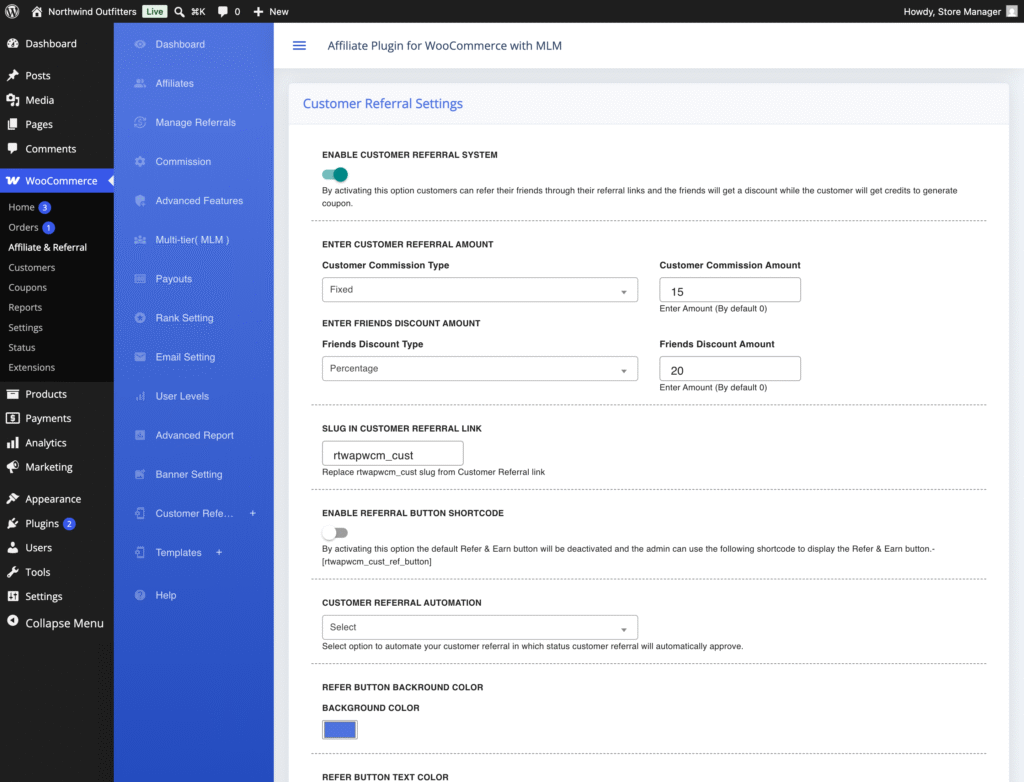
Setup is one screen. Enable Customer Referral System, then the two reward amounts, the floating button or its shortcode, and how rewards get approved. What the screen does not let you set is as important: there is no minimum order value, no cap on what one customer can earn, and no first-order-only rule.
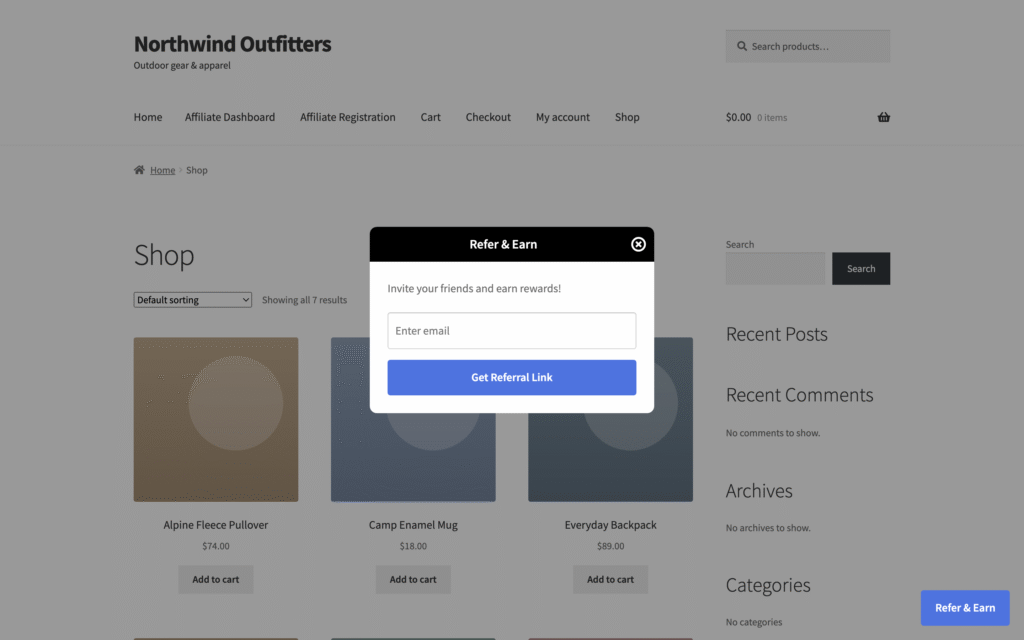
On the storefront the invitation is a floating Refer & Earn button, shown to every visitor who is not an affiliate. The panel asks for an email address and returns the customer’s personal link with a copy button, so someone can share without registering first. If a floating button does not suit your theme, the same panel is available as a shortcode you can place on a page.
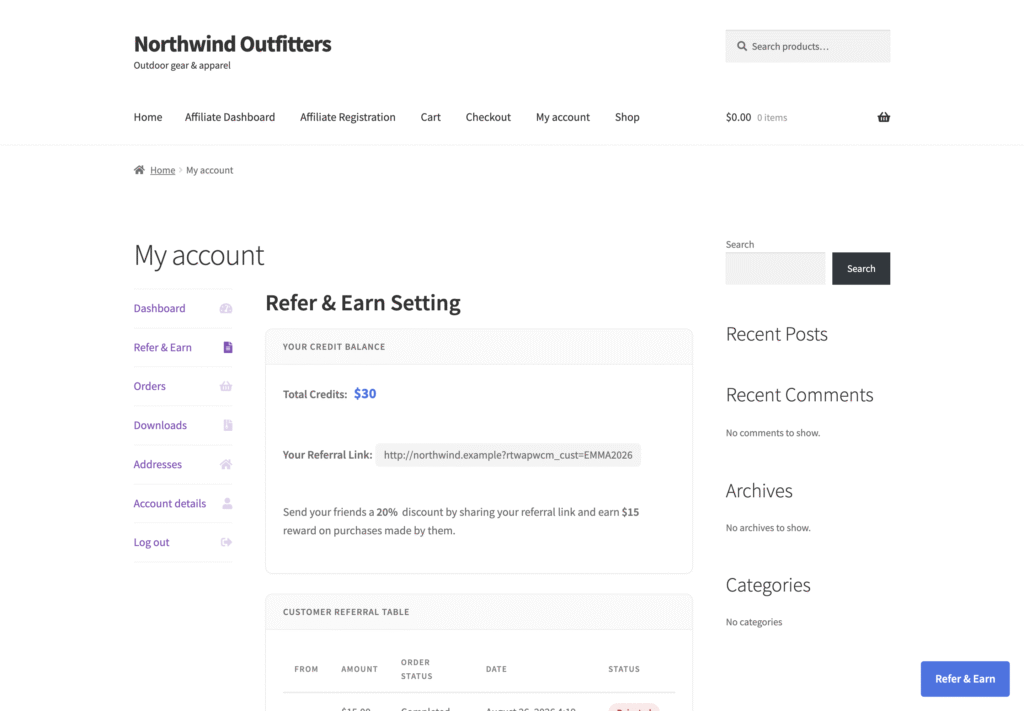
The advocate’s side lives in My Account, and this is where our approach differs most from the coupon-based options: the reward is a credit balance rather than a code in an email. The customer sees their total credit, their link, their referral history, and a generator that turns credit into a store coupon when they want to spend it. That coupon is single-use and locked to their email address, and if the order it is used on comes to less than the coupon the remainder is carried into a fresh one, so nothing is lost in rounding.
Now the limitation that matters most, stated plainly: the customer referral module has no self-referral prevention. A customer who orders through their own link is rewarded. There is no minimum order value and no reward cap either. What you have instead is a review step, and it is worth seeing what that looks like, because it is the whole of your defence: every referred order lands on the Customer Referral screen with the customer, the order reference, the order status and the amount, waiting for Approve or Reject, singly or in bulk. Set Customer Referral Automation to Processing or Completed only once you trust the pattern of your referrals; until then, approve by hand and read the names.
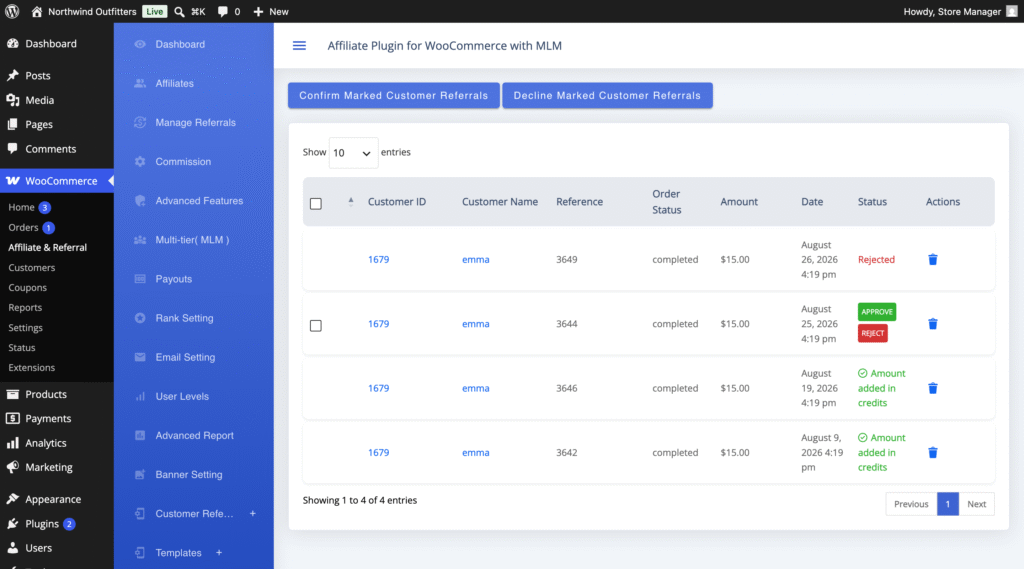
Two smaller details worth knowing before you set amounts. The two sides are calculated on different bases: the referrer’s credit on the friend’s order total, the friend’s discount on the cart subtotal. And a customer who becomes an affiliate switches tracks entirely, losing the Refer & Earn button and earning commissions instead, with the two balances never merging. The step-by-step setup is in the refer-a-friend program guide, and every setting is listed in the complete RedefiningTheWeb reference.
When ours is the wrong choice: if you want one coupon reward and nothing else, this is more plugin than you need and the WPGens free version will do the job. If a customer earning on their own link is unacceptable to you rather than merely annoying, choose a program that blocks it in software. And if you are already paying for AutomateWoo, adding its own add-on is cheaper than adding us.
AutomateWoo – Refer A Friend
The official WooCommerce answer, and the strongest fit for one specific store: the one already running AutomateWoo. It supports both campaign shapes, coupon-based and link-based, rewards the advocate with store credit or a coupon, gives the friend a discount coupon, and reports referral orders in the AutomateWoo dashboard. Its abuse rules are the most concrete published by any of the six: a referral is flagged and blocked from automatic approval when the advocate and the buyer share an IP address, coupon reuse is blocked through browser cookies, and the billing email is checked against previous orders.
The practical objection is arithmetic. The add-on is $99 a year and cannot run alone; it requires AutomateWoo at $159 a year, so a store buying both for the referral feature spends about $258 a year for the first program. If you already run AutomateWoo for abandoned-cart and follow-up emails, the marginal $99 is the best value in this comparison and the workflow engine is a genuine advantage, because referral emails become part of the automation you already maintain.
If you do not, you are buying a marketing automation suite to get a referral program. Two more things to weigh: advocates must have a store account before they can refer, and the add-on’s marketplace rating is 1.8 out of 5, though from only five reviews across 2,000-plus active installs, which is too small a sample to draw much from beyond a note to read those reviews yourself.
Refer a Friend for WooCommerce by WPGens
One job, done in coupons, with the clearest published rules about who can claim a reward. The advocate shares a link or a code, the friend receives a coupon, the advocate receives one back, and points are possible instead if you also run WooCommerce Points and Rewards. Its abuse handling is documented rather than implied: optional checks on IP address, email, shipping address and phone number, plus a rule that referral links work only for new customers or customers with no previous orders.
That last rule deserves a moment of your attention, because it is a policy as much as a control. It stops a returning customer being converted into a “referral”, which is honest, and it also means a long-standing customer who genuinely persuades their neighbour to buy earns nothing if the neighbour has ordered from you once before. Read it against your own repeat-purchase pattern. The free version on WordPress.org is enough to see the flow before paying, and Premium is $59 a year for one site, $99 for three, $199 for unlimited sites, or $139 once. For a store that wants a working coupon program this month and no ongoing administration, it is the shortest path here.
EchoRewards
The newest of the six and the easiest to try, because there is a free plan and the whole model is one idea: a floating widget, a referral coupon for the friend, a discount coupon for the advocate’s next order, percentage or fixed, with product and category targeting. It is built on WooCommerce’s own coupon system, which keeps the codes visible in the place you already manage discounts.
Two cautions. Pricing on the date we checked was a sale rate, $49 to $149 a year or $89 to $349 once, and the vendor shows higher regular prices beside them, so budget for the later number rather than today’s. And the pages we read do not set out how it handles a customer using their own coupon; ask before you rely on it. Suitable when you want to find out whether your customers will refer at all, at a cost of nothing, and to move later if they do.
WPLoyalty
Not really a referral plugin, and that is the point: it is a loyalty program in which referring a friend is one of several actions that earn points, alongside purchases, signups, reviews, social shares and birthdays. Buy it when you want a single scheme covering everything a customer does and referrals are one part of that story.
Do not buy it if refer-a-friend is the only thing you want, because your customers then have to understand points before they understand the invitation, and a points balance is a weaker prompt than “you have $15 credit” for a store people visit twice a year. Referral features are in every paid plan, there is a free lite version, and the plans on the date checked were $84, $124 and $236 a year against list prices of $105, $155 and $295.
ReferralCandy
The only hosted service here, and the only one where the price moves with your results: $39 a month plus a 10.5% success fee on Basic, through to $799 a month plus 0.25%, with the fee charged on a new customer’s first three orders. It buys campaign tooling, reward flexibility (cash, store credit, a percentage off or gift cards, set separately for each side) and an advocate portal someone else maintains.
The trade is ownership. The referral records and the reward balances live in their system, not your database, so exporting or auditing them later is on their terms, and the fee compounds precisely when the program starts working. It earns its place for stores with a marketing team, a real budget and impatience with plumbing. It is the wrong shape for a one-person store watching costs, which is most WooCommerce stores. Its features page names fraud detection without publishing the specifics, so ask what is actually checked before you rely on it.
Considered and left out
Advanced Coupons appears on most lists of customer referral plugins and does not belong on one. It is a coupon and store-credit product, and a good one: store credit is in the free version, credit reminder emails and reporting come with the paid plans, and the loyalty program arrives only in the top bundle at $249 a year. But it has no customer referral module of its own to compare here; the referral wording on its site is about earning commissions for sending clients to them. If store credit is already central to how you sell, it is a fine companion to a referral plugin rather than a substitute for one.
WooCommerce Points and Rewards, the official extension, is the other one people expect to see. It awards and redeems points and its documentation describes no refer-a-friend feature; the WPGens plugin above uses it as a reward channel rather than competing with it.
The short answer, by store
- Already running AutomateWoo: its Refer A Friend add-on, at $99 a year on top of what you pay already.
- Want customer referrals now and affiliates later: ours, at $96 a year for both programs, with the review step doing the work that self-referral prevention would.
- Want the least software for one coupon reward: the WPGens plugin, free to start, $59 a year when you want the rest.
- Not sure customers will refer at all: EchoRewards’ free plan, then decide.
- Selling consumables to people who buy monthly: WPLoyalty, with referral as one earning action among many.
- Have a marketing team and referred volume already: ReferralCandy, if its success fee at your volume still beats a licence.
Whichever you pick, set the two reward amounts against a real order rather than a round number, and write the rules where customers can read them. If the program will sit beside a full affiliate program, the affiliate plugin comparison covers that half of the decision.
Want a refer-a-friend program and an affiliate program from one plugin?
Affiliate and Referral Program for WooCommerce runs the customer referral module beside the affiliate program, with separate rewards, balances and dashboards: store credit for the referrer, a checkout discount for the friend, and credit that converts into a single-use store coupon. It is sold on the WooCommerce Marketplace for $96 a year.
Related guides:
Questions merchants ask when comparing customer referral plugins
Which refer-a-friend plugin should a WooCommerce store choose?
It follows from what you already run. A store on AutomateWoo should add its Refer A Friend add-on at $99 a year. A store that wants customer referrals now and affiliates later gets both from Affiliate and Referral Program for WooCommerce at $96 a year. A store that wants one coupon reward and nothing else is best served by the free WPGens plugin, with $59 a year when it needs more.
Do I need AutomateWoo to use its Refer A Friend add-on?
Yes. The add-on requires AutomateWoo to be installed and active, so the real first-year cost is about $258: $99 for the add-on and $159 for AutomateWoo itself. It is the best value here if you already pay for AutomateWoo, and an expensive way in if you do not.
How do I stop customers referring themselves?
Check what your plugin actually does, because these six differ. AutomateWoo flags a referral when the advocate and buyer share an IP address and blocks it from automatic approval. The WPGens plugin offers checks on IP address, email, shipping address and phone number and limits referral links to new customers. The customer referral module in Affiliate and Referral Program for WooCommerce has none of this, so its review step is your control: approve rewards by hand until the pattern looks right.
Can one plugin run a customer referral program and an affiliate program?
Affiliate and Referral Program for WooCommerce does, as two separate modules in one licence: the Refer & Earn invitation is hidden from affiliates, customer credit is a different balance from the affiliate wallet, and each program has its own link slug. The others in this comparison are referral or loyalty products only, so adding affiliates later means adding another plugin.