Most WooCommerce affiliate programs do not fail because the software is wrong. They fail because the store switched the program on, published a page nobody reads, and waited. Recruiting is the part that decides whether a program earns anything, and it is a sales job: you are asking people with an audience to spend their reputation on you. This guide covers how to recruit affiliates for a WooCommerce store: where they come from, what a partner needs to see before saying yes, how to vet applicants without discouraging good ones, and what to hand them in their first week.
We build Affiliate and Referral Program for WooCommerce, and the screens below are its own, so the mechanics are described from the inside, including what it does not do. If the program itself is not set up yet, start with the step-by-step guide to starting an affiliate program and come back here.
Table of Contents
What a partner needs before they say yes
Nobody joins a program because the sign-up form is pretty. Before you write to anyone, be able to answer five questions in one screen of text, because these are the questions every experienced affiliate asks and most stores cannot answer:
- What do I earn, on what basis? A number, and what it is calculated on. In our plugin commission is worked out per order line on the total after discounts, excluding tax and shipping, which is worth saying plainly because affiliates have been burned by programs that quietly pay on a smaller base. Setting the rate itself is a margin exercise, covered in commission structures and how to set rates.
- How long does my link stay credited? The referral window in days, and whether a later click by someone else takes the sale.
- When and how am I paid? The method, the minimum and the day of the month. Vague answers here lose the affiliates who have been paid late before; the trade-offs are in how to pay affiliates in WooCommerce.
- What can I promote with? Links to any page, a coupon code if you issue one, banners, product images.
- What are the rules? Brand bidding, discount claims, email lists. Short and in writing.
Put those answers on the page your application form sits on, above the form. That page is your pitch; the form is the formality.
Where WooCommerce affiliates actually come from
Ranked by what they cost you to find and what they return, for a store without an affiliate manager.
| Source | Effort to reach | What you typically get | Watch for |
|---|---|---|---|
| Your own customers | Low: one email, one line in the order-confirmation, a link in the account area | Many small promoters, a few genuinely good ones, and near-zero acquisition cost | They will buy through their own link unless you stop it; the restriction is off by default |
| Your existing audience (list, social following, community) | Low: you already have their attention | People who already know the product and can describe it accurately | Enthusiasm without reach; expect a long tail of one-sale affiliates |
| Niche publishers and creators | High: individual research and a personal message each | The bulk of real revenue in most programs, from a handful of partners | They compare programs; a weak rate or slow payouts lose them quietly |
| Complementary brands (non-competing, same customer) | Medium: a founder-to-founder conversation | Credible recommendations and sometimes a reciprocal arrangement | Needs a person to maintain the relationship |
| Coupon and deal sites | Low: they find you | Volume that often would have bought anyway | Discount plus commission on your own search traffic; see the leakage section in the fraud guide before you accept them |
The order matters more than the list. Start with customers and your own audience, because they convert into affiliates at a rate no cold outreach matches and they cost nothing to reach. Move to publishers once you can show a working program and pay on time, because that is what they will ask about. Treat coupon sites as a deliberate decision rather than a default.
How to recruit affiliates worth having
For customers and your own list, the mechanism is an invitation, not a campaign: one honest email explaining that they can earn on what they already recommend, a link to the application page, and the five answers above. Repeat it twice a year rather than monthly.
Publishers and creators need individual work, and the mistake is treating it as a numbers game. Ten researched messages beat two hundred templated ones, because the person reading knows within a sentence whether you have looked at their work. What earns a reply: naming the specific piece of theirs your product fits, saying what you sell in one line, giving the rate and the payout terms in the first message rather than hiding them behind a call, and offering a sample or account so they can form an honest opinion. What kills it: “Dear Sir/Madam”, a rate you will not state, and asking them to apply through a form before you have said anything about the deal.
Expect a low reply rate and a long lead time. A publisher who says yes in March may publish in June; that is normal and is why programs are judged after two quarters, not two weeks.
Vetting applicants without scaring off the good ones
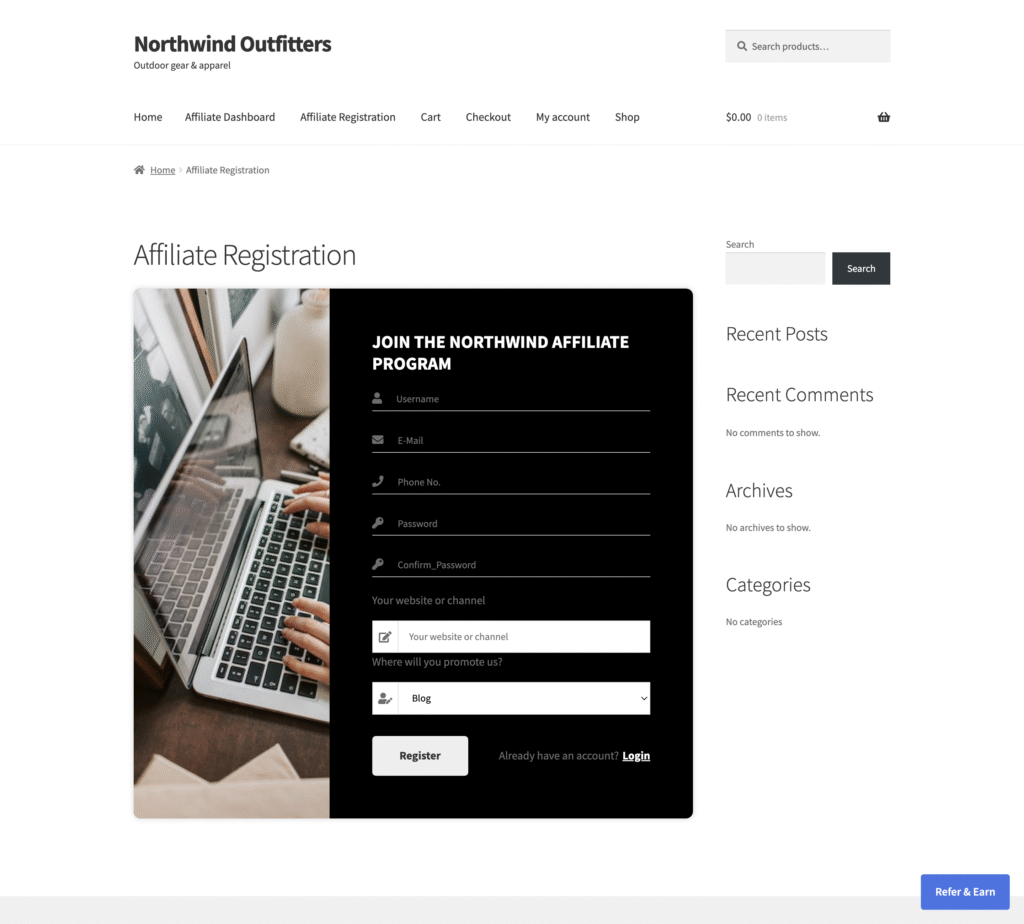
Open registration attracts bots and link-spammers; a heavy application form loses the busy publisher. The balance most stores land on is a short form with two or three questions that a real promoter can answer in a minute, plus manual approval for the first months.
In our plugin, Affiliate Verification under Advanced Features → General is what makes applications wait for you; it is off by default, so anyone who registers is active immediately until you switch it on. The registration form builder adds your own fields — a website, a social handle, an audience size — and the answers are stored on the affiliate’s profile where you can read them while deciding. Approve from the row on the Affiliates screen or tick several and use Approve all marked affiliates.
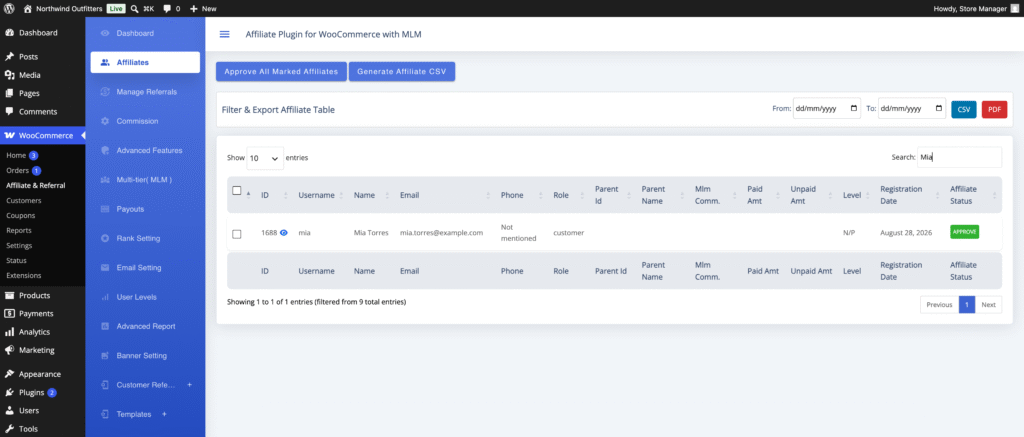
One behaviour to know before you rely on it: there is no rejected state. An applicant you do not approve simply stays inactive and is told nothing, so if you want to decline someone politely, email them yourself. Approval, on the other hand, can send a confirmation message whose wording lives on the Customize Affiliate and Referral Emails screen. The screens and the bulk actions are covered in approve and manage affiliates, and the form itself in the registration form guide.
What to hand them in the first week
The week after approval is when a program is won or lost. An affiliate who does not publish in the first fortnight usually never does, and the cause is almost always that they did not know what to post. Give them, in one message: their link, one coupon code if you issue them, two or three product pages worth promoting, image assets, and the one sentence you would like them to use about the product.
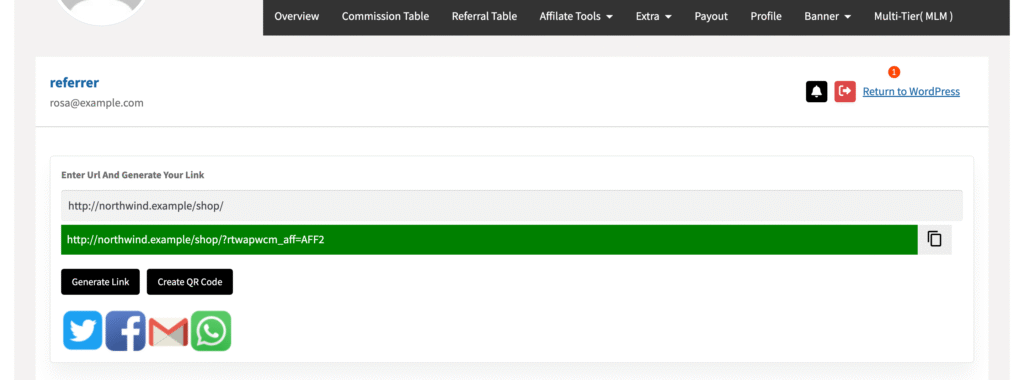
The dashboard does most of this for you. Affiliates generate a link to any page of the store from the link generator, share it to the four built-in channels, and turn any link into a QR code for offline use; product links are made from the banner tab’s product search.
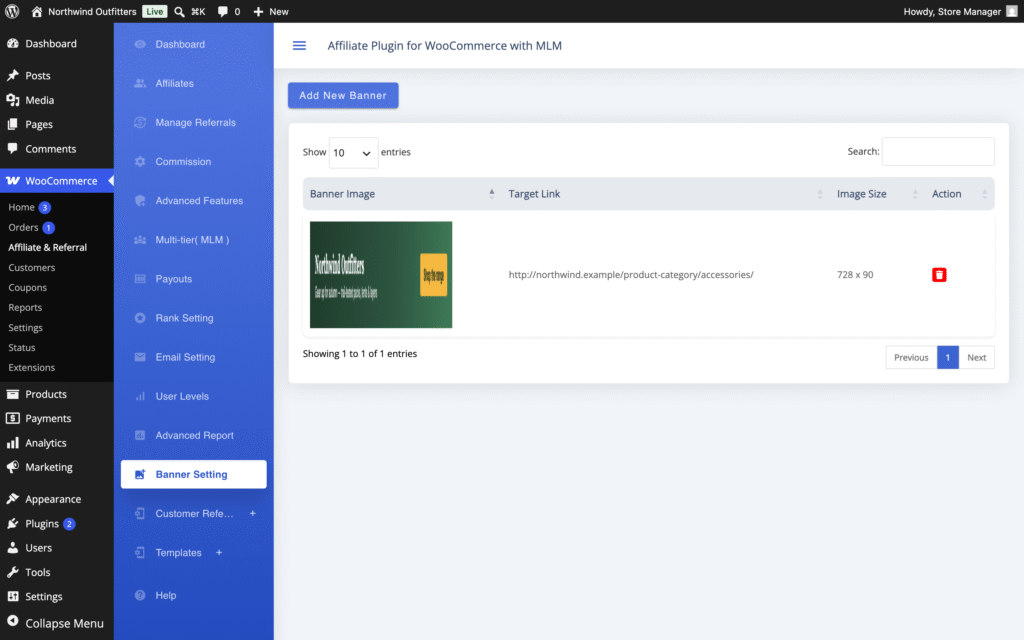
Creative comes from the banner library you fill in the admin: upload an image, set its target URL and size, and affiliates copy a ready-made snippet from their dashboard. It is worth loading two or three sizes before you recruit rather than after, because “we will send you banners next week” is where momentum dies. One honest limitation: there is no per-banner impression tracking, so you will know which links convert but not which creative was seen.
Keeping the ones you recruited
Recruitment without retention is a treadmill. Three things keep affiliates active, and none of them is a rate rise. Pay on the day you said, every month, without being chased. Tell them what is happening — new products, a seasonal rate, stock that is about to sell out — through the announcements on Advanced Features → Notification, remembering that announcements are plain text with no links and that the notification bell appears on dashboard Template 1 only. And answer their questions like a partner rather than a support queue; the affiliate who cannot get an answer about a missing commission stops promoting long before they complain.
Watch the small number that matter. In most programs a handful of affiliates produce nearly all the revenue, so a monthly look at the Affiliates screen, sorted by earnings, tells you who deserves a personal email, a better rate or a product sample. Hundreds of dormant accounts are not a program; five active partners are.
Where the software stops and you start
Affiliate and Referral Program for WooCommerce handles everything from the application onwards: the registration form and its custom questions, verification and approval, the affiliate dashboard with links, coupons, QR codes and banners, commission rules, the wallet and payouts. What it does not do — and no affiliate plugin we know of does for a self-hosted store — is find the partners for you.
There is no prospecting list, no outreach sequence and no CRM; the five emails it sends are plain messages you edit, not a nurture campaign. Recruiting stays a person’s job, and the plugin’s part is making sure nobody who says yes is lost to a clumsy sign-up or a late payment. Every setting is listed in the complete RedefiningTheWeb reference.
Two settings deserve a decision before you invite your own customers, because both bear directly on recruiting from your buyer list. Restrict commission on own referral on the Commission screen is off by default, which means a customer who becomes an affiliate can buy through their own link and earn on it. And if you plan to recruit at scale from customers, decide whether the reward you are offering is really an affiliate commission or a refer-a-friend credit, because they attract different people and are administered differently.
Running the program the affiliates you recruit will actually use?
Affiliate and Referral Program for WooCommerce covers the application form and its custom questions, approval, the affiliate dashboard with links, coupons, QR codes and banners, commission rules, the wallet and PayPal, Stripe or bank payouts. It is sold on the WooCommerce Marketplace for $96 a year.
Related guides:
Questions merchants ask about recruiting
How many affiliates does a WooCommerce store need?
Fewer than most merchants expect. In a typical program a handful of partners produce nearly all the revenue, so five active affiliates who publish are worth more than three hundred dormant sign-ups. Recruit for fit rather than volume, and review the Affiliates screen by earnings each month to see who is actually working.
Should I approve every affiliate who applies?
No, but decide deliberately. In Affiliate and Referral Program for WooCommerce, Affiliate Verification under Advanced Features is off by default, so every registration is active immediately until you switch it on. Turn it on, ask two or three questions on the form, and read the answers before approving. Note that there is no rejected state: an applicant you do not approve stays inactive and is told nothing, so decline by email if you want to be courteous.
How do I get approved affiliates to actually start promoting?
Remove the excuses in the first week. Send their link, a coupon code if you issue one, two or three product pages worth promoting, banner assets and one sentence describing the product. Affiliates who do not publish within a fortnight rarely do, and the usual reason is that they did not know what to post rather than a lack of interest.