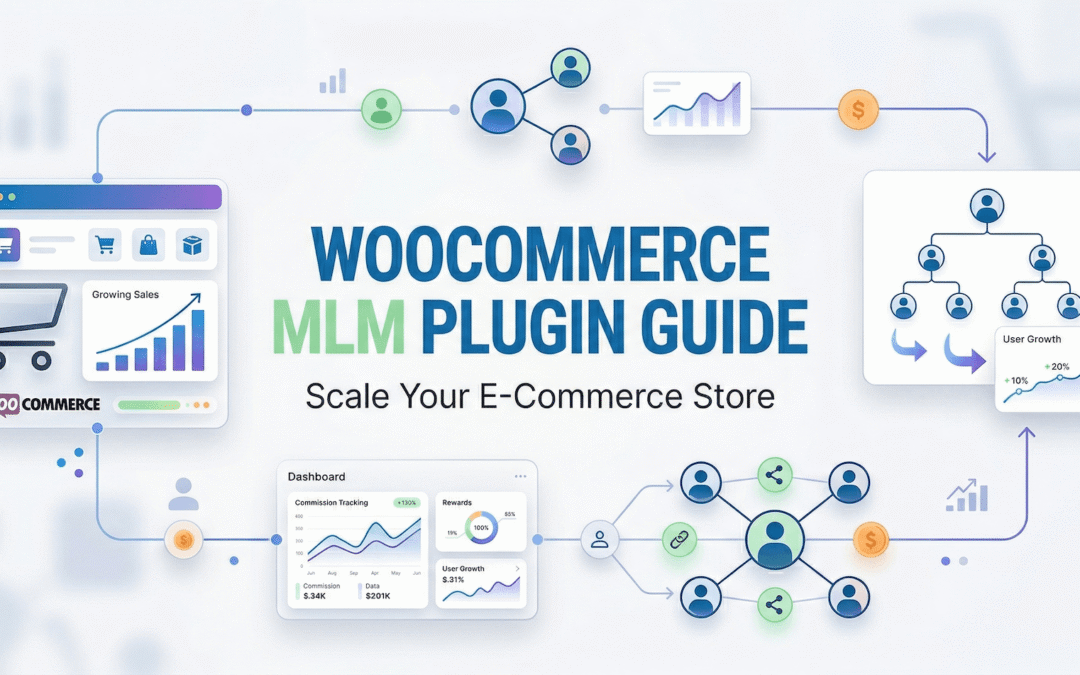
A WooCommerce MLM plugin adds multi-tier commissions to an affiliate program: when an affiliate’s recruit makes a sale, the people above that recruit in the network also earn a commission, at a rate you set for each level. That is the whole feature, and the decisions that matter sit around it: whether your program needs it at all, how deep and how wide the network should be, what the per-level rates are calculated on, and which plan type shapes the network. This guide works through those decisions with a worked example, separates multi-tier commission from the two things it is most often confused with, and compares five plugins that offer it for WooCommerce, with prices checked on 7 September 2026.
Affiliate and Referral Program for WooCommerce is our plugin, so it is the one described in detail and shown in the screenshots; the click-by-click setup lives in its documentation rather than here. If you are choosing an affiliate plugin in general, start with our comparison of WooCommerce affiliate plugins; if you are setting up a program for the first time, the step-by-step guide to starting an affiliate program comes first. MLM here means multi-level marketing in the software sense: a commission structure inside a store’s affiliate program, not a business model.
Table of Contents
Do you need multi-tier (MLM) commissions at all?
Multi-tier commission pays people for sales they did not make themselves. That is worth paying for in three situations:
- The program is built around recruiting. Ambassador, reseller and direct-selling style programs, where bringing in other sellers is part of the job and the network is the point.
- Your affiliates run teams. Agencies, communities and creators who manage other creators, and who expect a share of what the team sells.
- You want a small, capped reward for introductions. One level, a modest percentage of the recruit’s commission, and a monthly ceiling.
It is not worth it when your affiliates are publishers and creators who will never recruit, when the goal is to reward individual results (performance-based direct commission, ranks and bonuses do that without a network), or when margins cannot absorb an extra payout on every networked sale. Every level you add pays out on every qualifying sale, and the arithmetic below shows how quickly that grows under the wrong base.
How multi-tier commissions work, with a worked example
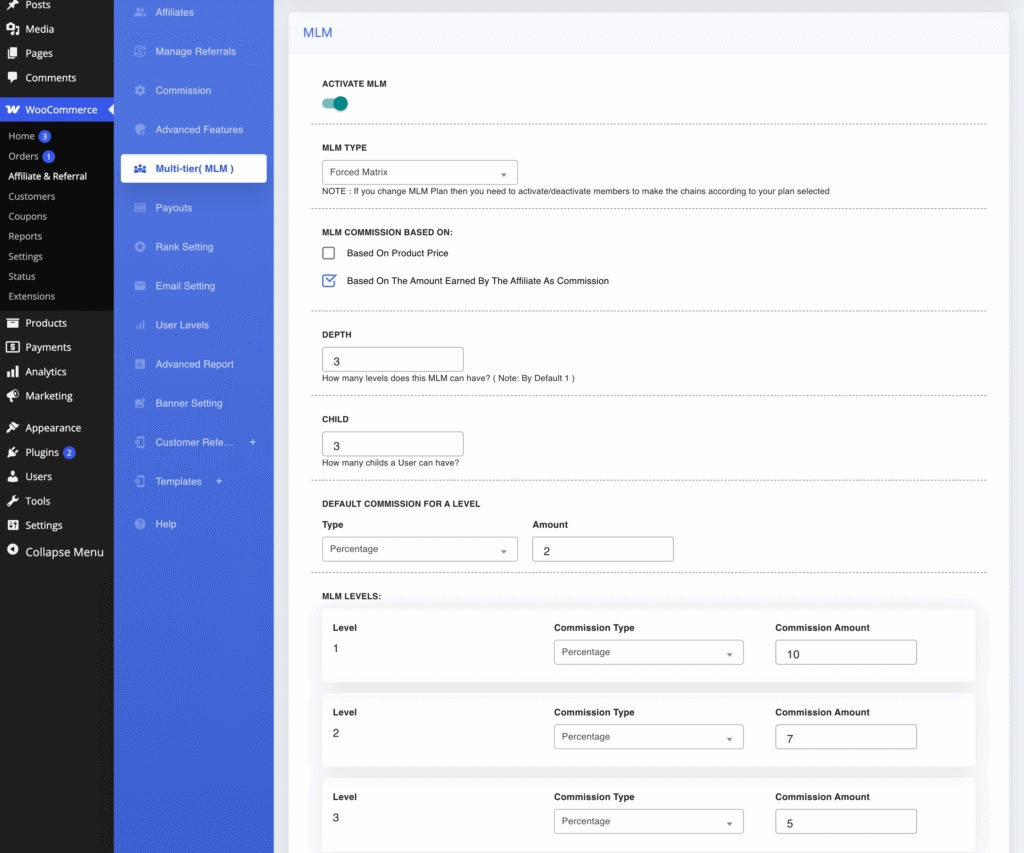
When a referred order creates a commission for the selling affiliate, the plugin walks up the network one parent at a time, one hop per configured level, and pays each qualifying member their level’s own rate. Rates are set per level as a percentage or a fixed amount, they do not compound, and nothing is taken from the seller’s own commission. Two settings decide the money: Depth, how many levels above a sale can earn from it, and the base the level rates apply to. In Affiliate and Referral Program for WooCommerce the base is either the selling affiliate’s own commission (the default) or the order’s product total.
- A $200 order arrives through a recruit’s link. The recruit earns a 10% direct commission: $20.
- Level rates of 10%, 7% and 5% with a depth of 3, based on the affiliate’s commission: the recruiter earns $2.00, the recruiter’s recruiter $1.40 and the member above them $1.00. The network costs $4.40, or 2.2% of the order, on top of the $20.
- The same rates based on product price: $20, $14 and $10. The network costs $44, or 22% of the order, on top of the $20 direct commission. Same screen, same rates, ten times the cost.
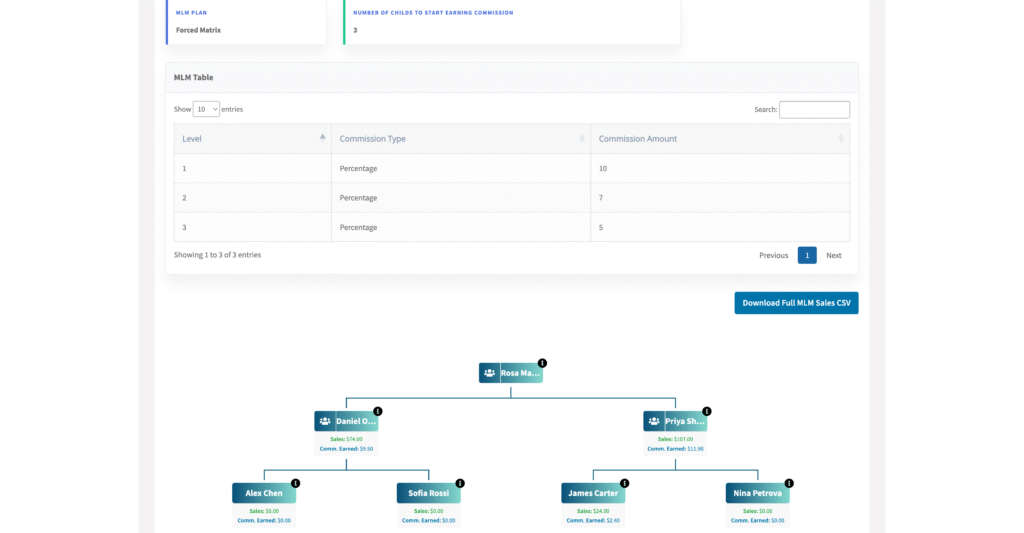
Set the base before you set the rates, and place one real test order before recruiting starts. There is a second condition to know about: in every plan type except Unlimited, a member earns from their chain only once all of their recruit slots hold active recruits. The affiliate dashboard shows this as “Number of Childs to start earning commission”. Only active recruits count, so deactivating a member is a commission switch for that branch, not a cosmetic hide. The MLM setup guide documents every field on the screen below.
Direct commission, performance-based direct commission and MLM are three different things
Three features in an affiliate plugin use the word level somewhere, and mixing them up is the most common configuration mistake in an MLM setup. They pay different people on different sales. Our guide to affiliate commission structures and rates compares what each of them costs the store.
| Feature | Who earns | On whose sales | Where it is set |
|---|---|---|---|
| Direct commission | The referring affiliate | Their own referred orders | Commission: store-wide, per product, per category and per-affiliate rules |
| Performance-based direct commission (User Levels) | The same affiliate, at the rate of the level they hold | Still their own referred orders; the rate rises at referral or sales targets | User Levels; while it is on it replaces the product and category rules |
| Multi-tier (MLM) commission | The recruiters above the seller | The recruit’s sales, one rate per network level | Multi-tier( MLM ) |
| Ranks and bonuses | The affiliate | A one-off amount at a milestone, on top of any commission model | Rank Setting and Advanced Features |
A performance level changes the affiliate’s own rate on their own orders; it never changes what the network pays, and it is not a network level. An affiliate can hold a performance level and sit in a network at the same time. The performance-based commission page covers the level ladder; ranks are on the ranks and rank bonuses page.
Plan types: binary, forced matrix, unilevel or unlimited?
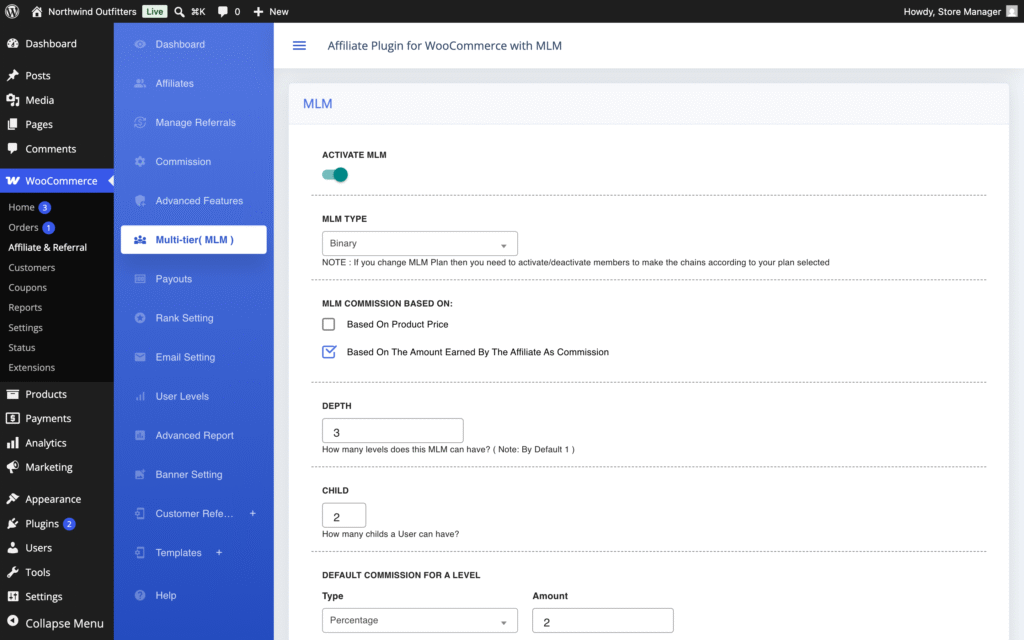
The plan type sets the shape of the network: how many direct-recruit slots each member has, the Child value, and therefore when a member starts earning from their chain. It does not change the rates, which always come from the level rows, and it does not change Depth, which is set separately and works the same under every plan.
- Binary: two slots per member, so the network grows as a tree of pairs. A member earns from the chain once both slots hold active recruits. A small, uniform recruiting target that everyone can see.
- Forced Matrix: you set the width. A 3×5 matrix is three slots per member and five levels deep; all slots must hold active recruits before the member earns, so a wider matrix is a higher bar.
- Unilevel: one slot per member, so every branch is a straight line, and one active recruit is enough to start earning from the line below. This is the plugin’s own definition of unilevel; other software uses the word for unlimited-width plans, so read it from the settings.
- Unlimited: no slot requirement. A qualifying sale anywhere below a member pays the levels above it, however many recruits each member has.
| Plan | Recruit slots per member | Earns from the chain when | Choose it when |
|---|---|---|---|
| Binary | 2 (preset) | both slots hold active recruits | you want every member to recruit a little before earning from others’ sales |
| Forced Matrix | your choice | all slots hold active recruits | you want to set the recruiting bar yourself and fix the network’s dimensions |
| Unilevel | 1 (preset) | the one slot holds an active recruit | you want simple one-line chains |
| Unlimited | no limit | from the first qualifying sale below the member | network earnings should start with the first recruit and nobody’s commission is gated |
Pick the plan before recruiting starts. Changing it later, or changing the Child width, does not rearrange the network: the settings screen warns that after a plan change you need to activate or deactivate members so the chains match the plan, and until you do, members whose slot counts no longer fit will not earn from their chains. The MLM plan types page compares the four in more detail.
What admins and affiliates see: the genealogy tree
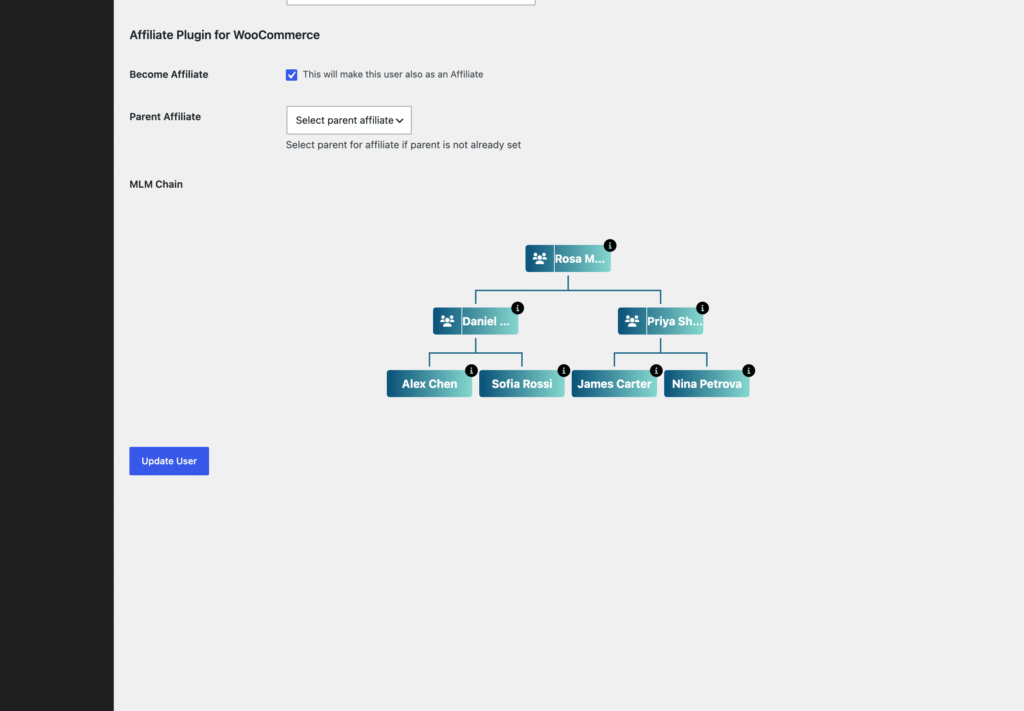
A network you cannot see is a network you cannot manage, so check how a plugin shows it to both sides. In Affiliate and Referral Program for WooCommerce a new affiliate joins under the affiliate whose link brought them, as long as that recruiter has an open slot, and you can also place affiliates by hand from their WordPress user profile with Select parent for affiliate if parent is not already set. A parent cannot be changed once set, so place carefully. The same profile draws the affiliate’s network as a tree, the MLM Chain section, where hovering a member offers Activate and Deactivate for that position.
Affiliates get their own view in the dashboard’s Multi-tier( MLM ) tab: the plan they are on, how many recruits they need before the chain pays, the per-level rate table, a Download Full MLM Sales CSV export of their downline’s sales, and their tree with each member’s sales and commission earned. An optional setting lets affiliates activate or deactivate members of their own chain; leave it off unless you want recruiters to be able to switch a branch’s commissions off themselves.
What to check before you choose an MLM plugin
- Structure, not just a chain. A chain of referrers with a rate per level is the minimum; named plan types with recruit-slot rules are what make a program a program.
- Depth and per-level rates you control, percentage or fixed, with a clear statement of the base they apply to.
- A genealogy tree for both sides, with per-member sales visible to the recruiter, and an export.
- A ceiling. A monthly cap per affiliate, and a choice about whether network commission counts toward it.
- Approval before payout, so network commissions on refunded orders never leave the building.
- Payouts built in, PayPal batch payouts at least, and a wallet if you want commissions spent in the store.
- Separation from direct commission and from performance levels, so an affiliate’s own rate and the network’s rates never interfere.
- WooCommerce-native: commissions from WooCommerce orders, HPOS and block checkout support declared, affiliates as WordPress users.
Five WooCommerce MLM plugins compared (prices checked 7 September 2026)
Prices were read from each vendor’s page on 7 September 2026. Feature notes come from those pages, the vendors’ documentation and our August 2026 research; “not stated” means the vendor’s page did not say.
| Plugin | Price (7 Sep 2026) | Network structure | Rates and depth | Genealogy tree | Also included | Scope |
|---|---|---|---|---|---|---|
| Affiliate and Referral Program for WooCommerce | $96 a year | Binary, Forced Matrix, Unilevel, Unlimited | Per-level percentage or fixed, depth you set, base = seller’s commission or product price, optional monthly cap | Admin and affiliate views, downline CSV | Affiliate program, separate customer refer-a-friend module, wallet, PayPal Payouts API, Stripe through the free add-on | WooCommerce only |
| Affiliate for WooCommerce (StoreApps) | $179 a year | Chain of referrers, unlimited levels | Per-level rates | Not stated | Lifetime commissions, PayPal and Stripe payouts, one-click import from AffiliateWP | WooCommerce only |
| AffiliateWP Pro | $209.65 first year, renews at $599 | Chain of referrers (Multi-Tier Commissions) | Rate per level | Not stated | Payouts Service, recurring referrals, Fraud Prevention Suite | WordPress, many integrations |
| Ultimate Affiliate Pro | $89 one-time regular licence (CodeCanyon), checked 5 September 2026 | “Unlimited affiliate levels”; page lists UniLevel, Force Matrix and Binary Matrix | Per-level rates (vendor claim) | Not stated | Ranks, general affiliate features | WordPress |
| Webkul WooCommerce Binary MLM / Matrix MLM | $59 (list $99) binary; $299 matrix; one-time | Binary only, or matrix with configurable width and height, one plan per product | Per-level commission (vendor pages) | Admin and sponsor views | Wallet, bulk commission payment from the wallet | WooCommerce only |
1. Affiliate and Referral Program for WooCommerce
Affiliate and Referral Program for WooCommerce is sold on the WooCommerce Marketplace for $96 a year with multi-tier commissions included, not as an add-on or a higher plan. It is the only plugin in this comparison with all four plan types, a depth and per-level rates you set, a choice of base, a genealogy tree on both the admin and the affiliate side with a downline export, and a monthly cap that can include network commission. It also runs the ordinary affiliate program and a separate customer refer-a-friend module, pays through the PayPal Payouts API in one batch, adds Stripe through a free add-on, and keeps a wallet that affiliates can turn into store coupons.
Where it falls short: tracking runs in the browser, so test it with your caching and consent tools; a parent cannot be changed once set, so placements need care; and the plan and width should be fixed before recruiting starts because reshaping a live network means touching real positions. Best for: WooCommerce stores that want a structured network with named plan types and everything else in the same plugin.
2. Affiliate for WooCommerce (StoreApps)
Affiliate for WooCommerce offers multi-tier commissions with unlimited levels as a chain of referrers: when a recruit sells, the people who referred them earn their level’s rate, illustrated on its page by a three-person example. It costs $179 a year for one site, includes lifetime commissions and PayPal and Stripe payouts, and imports affiliates from AffiliateWP in one click. Where it falls short: there are no plan types or recruit-slot rules, so the network is a chain rather than a structure, and its page does not describe a genealogy view. Best for: stores that want a simple multi-level override inside a mature affiliate plugin.
3. AffiliateWP Pro
AffiliateWP offers Multi-Tier Commissions in its Pro plan and above: $209.65 for the first year and $599 at renewal on 7 September 2026, for five sites, alongside recurring referrals, tiered affiliate rates and its Fraud Prevention Suite. It pays a rate per level through a chain of referrers and has no named plan types. Its strengths are outside the network: the widest integration library in WordPress and a managed Payouts Service on every plan. Where it falls short: the price of the plan that includes multi-tier, and the absence of structure or a customer referral module; our AffiliateWP alternatives comparison covers the full plan list. Best for: sites that sell beyond WooCommerce and already need Pro for other reasons.
4. Ultimate Affiliate Pro
Ultimate Affiliate Pro is a general WordPress affiliate plugin sold on CodeCanyon; on 5 September 2026 the regular licence was $89 one-time, with 17,480 sales, a 4.57-star rating from 367 reviews and an update dated 1 September 2026. Its page advertises unlimited affiliate levels and lists UniLevel, Force Matrix and Binary Matrix options, with ranks on top; treat those as the vendor’s description, since we have not run it. Where it falls short: it is not WooCommerce-native, its page does not describe a wallet or a separate customer referral program, and a one-time licence means support is time-limited. Best for: general WordPress sites that want a one-time price and a large install base.
5. Webkul WooCommerce Binary MLM and Matrix MLM
Webkul sells one plan per product: WooCommerce Binary Multi Level Marketing at $59 (list price $99) with a five-star rating from three reviews, and WooCommerce Matrix Multi Level Marketing at $299, both one-time, both on 7 September 2026. Each has a genealogy tree for the admin and for sponsors, a wallet with admin-run credit and debit transactions, and bulk commission payment from that wallet. Where it falls short: you buy the structure you want and cannot switch, there is no ordinary affiliate program or customer referral module around the network, and payouts are wallet transactions rather than a PayPal batch. Best for: stores that know they want exactly one plan and nothing else.
Setting up multi-tier commissions in Affiliate and Referral Program for WooCommerce
The documentation walks through every field; the order below is the order that avoids rework.
- Get the direct commission rules right first under WooCommerce → Affiliate & Referral → Commission; the network pays on top of them.
- Open Multi-tier( MLM ), switch on Activate MLM, and choose the MLM Type: Binary, Forced Matrix, Unilevel or Unlimited. Set Child if the plan leaves the width to you.
- Set Depth, then the base under MLM Commission Based On: the affiliate’s commission unless your margins are unusually high.
- Add one rate row per level under MLM Levels, and a Default Commission for a Level for levels without a row.
- Decide whether network commission counts toward the monthly cap, under Commission, and leave User can change status of members in his chain? off unless you want recruiters to control their branch.
- Place your first affiliates by hand from their user profiles if the network should start with a known shape, then let referral links fill the slots.
- Place a test order through a recruit’s link and check both the direct and the network rows under Manage Referrals before you announce anything.
Every screen is covered in the MLM setup guide, and the MLM section of the complete RedefiningTheWeb reference sits alongside it for the rest of the plugin’s settings.
Keeping a multi-tier program sane
- Keep depth at two or three. Deeper levels add cost to every sale and rarely change anyone’s behaviour.
- Base the rates on the seller’s commission unless you have checked the product-price arithmetic against your margins.
- Approve after the refund window. Network commissions are approved like direct ones under Manage Referrals; a pending commission is rejected when the order is refunded, an approved one is not reversed automatically.
- Use the cap. A monthly ceiling per affiliate, with network commission included, keeps one branch from dominating the payout.
- Write the terms in store language. Describe the program as commission on sales in the network, with the rates, the depth, the slot rule and the cap, and do not promise anyone an income.
- Treat deactivation as a commission switch. Deactivating a member stops their branch paying upward and can stop their parent earning, because a slot is no longer active; reactivating restores it.
Want multi-tier commissions with named plan types, without a second product or a higher plan?
Affiliate and Referral Program for WooCommerce includes Binary, Forced Matrix, Unilevel and Unlimited plans, per-level rates, the genealogy tree and PayPal batch payouts, alongside the affiliate and customer referral programs. It is sold on the WooCommerce Marketplace for $96 a year.
Related guides:
Frequently asked questions
Is an affiliate performance level the same as a network (MLM) level?
No. A performance level, set under User Levels, changes the affiliate’s own direct rate on their own referred orders. A network level is a position in the multi-tier structure and sets what recruiters earn from a recruit’s sales. The two run independently, and one affiliate can have both.
Do multi-tier commissions compound?
No. Each level earns its own rate on the same base, either the seller’s commission or the product total, and nothing is deducted from the seller. With rates of 10%, 7% and 5% on a $20 seller commission, the three levels earn $2.00, $1.40 and $1.00.
How many levels should a WooCommerce MLM plan have?
Start with two or three. Every level adds a payout to every qualifying sale, and levels beyond three rarely change a recruiter’s behaviour. Set Depth in the plugin, base the rates on the seller’s commission unless margins are unusually high, and switch on the monthly cap if you want a ceiling per affiliate.
Can I change the MLM plan type later?
You can, but the existing network keeps its old shape. The settings screen warns that after a plan change you need to activate or deactivate members so every branch matches the new plan, and until you do, members whose slot counts no longer fit will not earn from their chains. Choose the plan before recruiting starts.
Can I run multi-tier commissions alongside a normal affiliate program?
Yes. In Affiliate and Referral Program for WooCommerce the direct commission rules run as usual and multi-tier is a separate switch under Multi-tier( MLM ); affiliates who never recruit simply earn their direct commission. The customer refer-a-friend module is a third, separate program.